
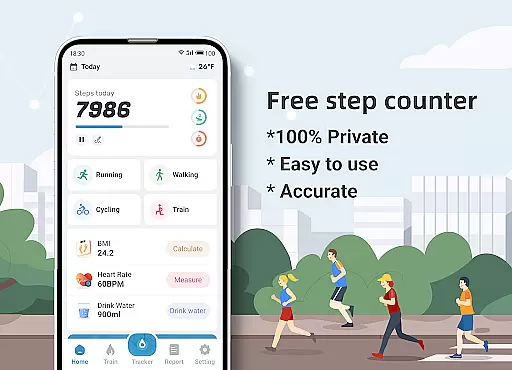
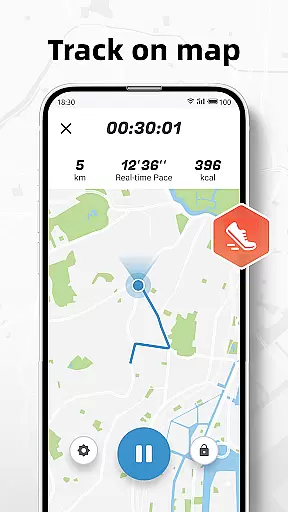
Step Counter - Pedometer & BMI is a comprehensive health and fitness application designed to track your daily steps, monitor BMI, and provide detailed activity reports. The app offers accurate step counting through your mobile device, eliminating the need for additional pedometer hardware. It stands out with unique features like GPS tracking that maps your walking or running routes while recording essential metrics such as distance and calories burned.
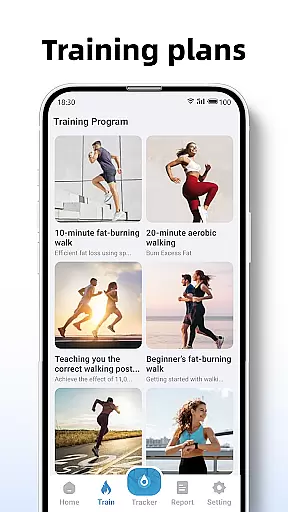
Beyond basic step counting, the app includes specialized training plans for users at different fitness levels, from beginners to advanced athletes. These guided programs help users establish and achieve their fitness goals systematically. The built-in BMI calculator provides valuable insights into your body composition, helping you maintain optimal health. With its privacy-focused approach, Step Counter ensures all your health data remains completely private and secure on your device.
Ideal for health-conscious individuals who want to monitor their physical activity and make informed decisions about their fitness routines, this app serves as a personal health assistant in your pocket. Whether you're walking around the neighborhood or engaging in structured exercise, Step Counter delivers the information you need to stay motivated and track your progress effectively.
Step Counter distinguishes itself through several key features that enhance the user's fitness tracking experience. The app's primary function is its highly accurate step-counting capability, which works seamlessly with your phone's built-in sensors. Unlike many competitors, it offers advanced GPS tracking that not only counts steps but also maps your entire walking or running route, providing comprehensive data about your outdoor activities.
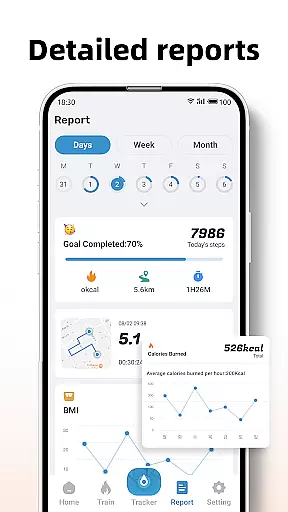
The app's reporting system is particularly robust, generating detailed visual reports for daily, weekly, and monthly activity patterns. These analytics help users identify trends in their exercise habits and make necessary adjustments. The training mode feature is another standout aspect, offering structured workout plans that guide users through various exercise routines while tracking vital metrics like active time, distance covered, and calories burned.
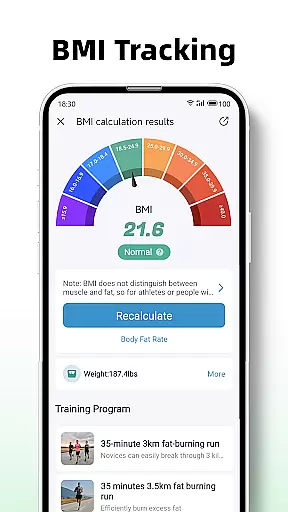
What sets Step Counter apart from similar applications is its integrated BMI tracking system. This feature allows users to regularly monitor their Body Mass Index, providing a more complete picture of their overall health status. The app's commitment to privacy is also noteworthy, as it guarantees 100% data protection without any third-party sharing. Additionally, users can customize their experience through adjustable sensitivity settings and personalized fitness goals, making it adaptable to individual needs and preferences.
Personalized planning in fitness applications refers to the ability to tailor workout routines and health goals according to individual user needs. Step Counter - Pedometer & BMI excels in this area by offering customizable training plans that cater to different fitness levels and objectives.
The app provides various training modes, such as a 10-minute jogging plan, which users can select based on their preferences or fitness goals. These plans are not only varied but also adaptable, allowing users to input personal data to refine the experience further.
By integrating BMI tracking, the application goes a step further in personalization. Users can calculate and monitor their BMI, using this data to adjust their fitness strategies accordingly. This feature ensures that each user's plan is closely aligned with their health status and targets.
Ultimately, the personalized planning offered by Step Counter empowers users to embark on a fitness journey that is both unique to their needs and flexible enough to accommodate changes over time, enhancing motivation and promoting long-term engagement with their health objectives.
Progress visualization is a critical component of any fitness app, providing users with tangible evidence of their achievements and encouraging continued effort. Step Counter - Pedometer & BMI offers detailed reports and graphs that display daily, weekly, and monthly activity data, making it easy for users to track their progress.
The app translates raw step counts and other metrics into visual formats that are easy to interpret. This includes charts that show trends over time, helping users understand how their efforts translate into results. Such visual feedback is invaluable for maintaining motivation and making informed decisions about one's fitness routine.
In addition to standard metrics like steps taken, the app also tracks active time, distance covered, and calories burned during workouts. By presenting these diverse data points through clear visuals, users gain a comprehensive view of their physical activities and improvements.
With its robust progress visualization features, Step Counter not only informs users about where they stand in terms of their fitness goals but also inspires them to push forward. The ability to see real progress serves as a powerful motivator, turning abstract numbers into meaningful milestones on each useru2019s path to better health.
User-friendly interface
Accurate step tracking
Comprehensive reports
Private data handling
Integrated BMI tools
Limited device support
No wearable sync
Basic social features
Occasional inaccuracies
Ads in free version

“Overcoming pain based on EMDR” helps you to alleviate chronic pain and stress.
 4.10
4.10
Sync your activities of the most popular sports tracking services
2.70
Optimization for TRT & Enhanced Athletes
4.4
Interval timer for High Intensity Interval Training, Tabata and Circuit Training
4.20
3D Body Measurement System
3.60
Turn your steps into cash, gift cards & rewards with our step counting pedometer
3.80
Eat smarter with Eato, your personal calorie counter and nutrition tracker!
4.40
Track heart rate & HRV in 30s! Get live health insights and anomaly alerts
4.40
Make sense of your health data.
3.80
Home workouts for fitness & fast bodybuilding at home - no equipment needed.
4.90
App to stop smoking slowly or now with a motivational badges and helpful tips
4.80
Wall Pilates at home & Pilates workout for beginners for core and weight loss.
4.80
Load the bar with this barbell & plate calculator. It's leg day, not brain day!
4.70
Drink water reminder app. Track water intake. Smart simple hydration tracker.
4.70
Your AI pet BFF. Talk, play, and beat anxiety in this calming game.
4.60
Period Tracker, the easiest way to track your periods!
4.50
Pedometer that gives you sweatcoins for steps. It pays to walk!
4.10
Find Paid Clinical Trials In Your Area
3.70
The Wear OS BeechBand app is designed to alleviate anxiety and other conditions
4.0


User Reviews