












Study Bible with Explanation is a comprehensive offline Bible study tool featuring the King James Version (KJV) with integrated audio capabilities. This app provides users with complete access to the KJV Bible, Matthew Henry's commentaries, and various reading features without requiring an internet connection. With its rich content and user-friendly interface, it serves as an essential resource for personal devotion, group study, or sermon preparation.
The app includes innovative features such as advanced search functionality, customizable verse highlighting, note-taking options, and adjustable font sizes. These tools enable users to engage deeply with biblical texts, organize their studies effectively, and personalize their learning experience. Whether at home, in church, or on the go, this app ensures that users can explore and understand the scriptures conveniently.
One notable use case is its ability to support daily spiritual growth through scheduled inspirational verses and easy sharing options. Users can share meaningful passages via social media platforms, email, or messaging apps, spreading faith-based messages instantly. The app's robust feature set makes it particularly valuable for those seeking to deepen their understanding of the Bible while maintaining flexibility in how and where they study.
Study Bible with Explanation stands out with its extensive array of features designed to enhance Bible study. The app offers a complete King James Version Bible with Matthew Henry's insightful commentaries, all accessible offline. This ensures uninterrupted access to critical biblical resources regardless of internet availability. Additionally, the high-quality audio Bible allows users to listen to scriptures, making it ideal for auditory learners or those who prefer listening during commutes or chores.
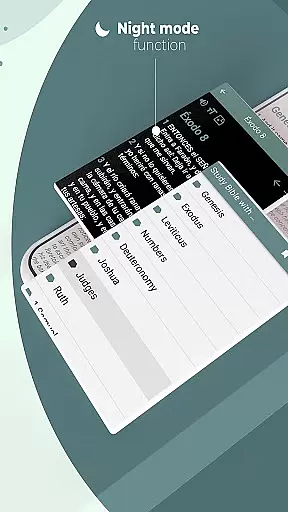
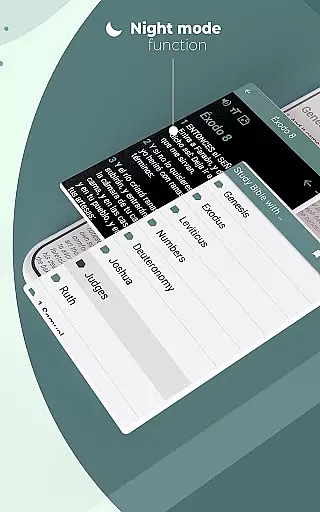
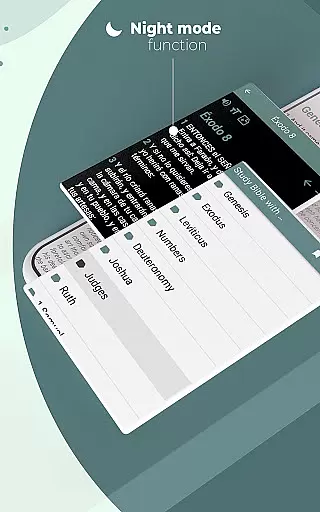
Innovative functionalities include keyword-based search for quick navigation to specific books, chapters, or verses, and customizable highlighting options in various colors for organizing thoughts visually. Users can add dates, create favorites lists, and write personal notes directly within the app. Features like adjustable font sizes and night mode provide comfort during extended study sessions, while the ability to track the last read verse helps maintain continuity. These thoughtful additions demonstrate the app's commitment to delivering a superior user experience tailored to diverse study preferences.
Another significant aspect is the app's social sharing capability. Users can convert Bible verses into images for sharing on social networks, send texts via email or messaging apps, and receive daily inspirational verses. This fosters community engagement and encourages regular interaction with biblical teachings. Overall, these features collectively empower users to maximize their study potential and integrate faith practices seamlessly into everyday life.
When evaluating a Bible study app, functionality completeness is crucial for an optimal user experience. The Study Bible with explanation app offers a comprehensive suite of features that cater to various study needs. It includes the full King James Version (KJV) Bible with Matthew Henry's commentaries, all available offline.
The app supports keyword searches across books, chapters, and verses, ensuring users can quickly find specific passages. Verses can be highlighted in customizable colors, annotated with notes, and bookmarked for future reference. Additionally, users can adjust font sizes and switch to night mode for comfortable reading in low-light environments.
Beyond basic reading functions, the app provides audio capabilities for listening to Bible texts, making it versatile for different learning styles. Its innovative features extend to social sharing options, allowing users to distribute verses via email, messaging apps, or social media platforms. This broad functional coverage ensures that users have multiple ways to engage with and share their faith.
Usability is a key factor in determining how effectively users can interact with a Bible study application. The Study Bible with explanation app excels in providing a user-friendly interface that simplifies navigation and enhances the overall user experience. With its intuitive design, even those new to digital Bible study can easily access desired texts and features.
Operational smoothness is evident in the app's ability to function seamlessly without an internet connection. Users can rely on consistent performance whether at home, in church, or on the move. The app maintains responsiveness across its various functions, from searching specific verses to managing personal notes and highlights.
Additional usability features include the ability to create favorite lists, add dates to annotations, and view the last read verse, which collectively contribute to a personalized and efficient study routine. These elements ensure that users can focus on their spiritual growth without being hindered by technical difficulties or complex operations.
User-friendly interface
Comprehensive offline access
High-quality audio Bible
Customizable study tools
Social sharing capabilities
Limited modern translations
No multimedia content
Basic design aesthetics
Occasional bugs reported
Heavy app size

If you are looking for melon playground mod that fun you deffinitely try our app
 2.70
2.70
Connect and find your Smarttag devices through our app.
4.00
With Endoscope Camera Connector you can connect your phone with endoscope cam
3.70
Test DPC is a sample device policy controller for use with Android Enterprise.
4.20
TV USB connector app provides you a seamless cast option from your phone to tv.
4.70
Enjoy hours of entertainment with our Roblox mobile games app
4.4
Demo version of the mcpro24fps manual video camera. Try and buy a full version!
4.00
Mirror Link Car Display to share your screen with car dashboard wirelessly
4.3
The best PS2 games from your childhood come to life in their mobile version!
4.00
SmartCast mirrors Android phone to TV screen With Cast Screen, Chromecast.
4.80
The Free Catholic Latin American Bible in complete Spanish
4.60
Wireless reverse charging using phone now is possible
4.30
Manage apps & elevate your gaming experience with Game Launcher: Gaming Hub app.
4.30
CloudEye 365 is a easy-handling APP
3.60
Experience virtual reality on your smartphone with Cardboard.
3.50
Connect and Find your smart tag via our app.our app is compatible with smarttag.
3.30
Looking to connect your phone to your car screen? Mirror Link is the solution.
3.20
DamonSx2 is the open Source LGPL Emulator
3.20
Identify securely online
3.10


User Reviews