
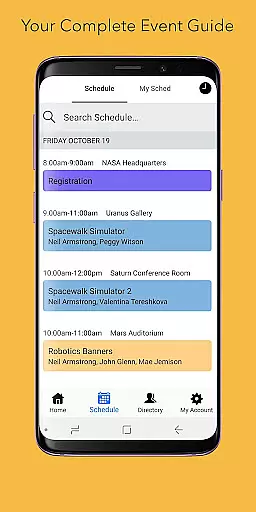
Sched is a premier platform for session registration and attendance management, designed to streamline the organization of complex multitrack events. This app consolidates all event details into one accessible location, offering users an efficient way to manage their events. With a vision focused on enhancing event experiences, Sched ensures that events are not just endured but truly experienced.
Key features include a comprehensive schedule display, personalized user experiences through customizable schedules, detailed directories of speakers and exhibitors, and reliable offline caching. These functionalities ensure that users can effectively manage and enjoy every aspect of their events, making Sched an invaluable tool for both event organizers and attendees.
Sched stands out with its robust feature set tailored for optimal event management. The app provides a full schedule view, enabling users to effortlessly browse and access key event information without needing a physical guide. This digital convenience significantly enhances the accessibility and usability of event schedules.
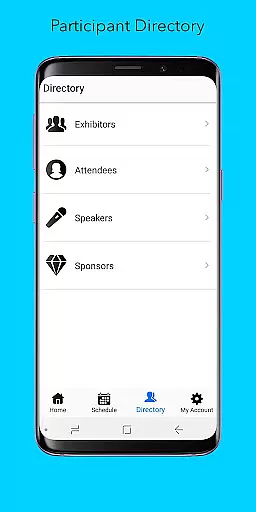
Personalization is at the core of Sched's offerings. Users can log in to view and modify their pre-created schedules directly from their mobile devices, ensuring flexibility and real-time updates. Additionally, the directory feature offers detailed professional profiles of speakers and exhibitors, enriching the user experience by providing valuable insights and networking opportunities.
Offline caching further amplifies Sched's reliability, guaranteeing that users have uninterrupted access to their schedules regardless of connectivity issues. This feature underscores Sched's commitment to delivering a seamless and dependable event management solution, empowering users to focus on what truly matters - engaging with the event content and community.
Task creation and detail customization are essential features for event management platforms like Sched. This functionality allows event organizers to create detailed sessions, workshops, or presentations with specific information such as time, location, speaker details, and session descriptions.
Sched offers a comprehensive suite of tools for task creation. Organizers can easily input session details, categorize events into tracks, and even add multimedia content to session descriptions. The platform also supports advanced scheduling options, enabling the setup of recurring sessions or multi-part events.
The benefits for users are significant. Attendees can access well-structured event information that helps them plan their participation effectively. They can search sessions by various criteria, filter through different tracks, and customize their schedules based on personal preferences. This level of detail empowers attendees to make the most out of their event experience.
Moreover, Sched's customization options extend to branding elements. Event organizers can incorporate logos, color schemes, and custom layouts to maintain brand consistency across all event materials. This feature ensures that while attendees enjoy personalized schedules, they remain immersed in the event's unique identity.
Reminder settings play a crucial role in ensuring attendees don't miss important sessions at events managed through Sched. This feature allows users to set up timely notifications for upcoming sessions, helping them manage their time efficiently during busy event schedules.
Sched implements reminder settings with flexibility and user control in mind. Attendees can choose how far in advance they wish to be reminded - whether it's minutes, hours, or days before a session starts. The app also supports multiple reminder formats including push notifications, emails, and calendar integrations.
This functionality provides substantial value to users. By receiving timely alerts, attendees can better organize their day, arrive punctually at sessions, and balance their participation in concurrent activities. The ability to customize reminder times caters to different personal preferences and schedule complexities.
Furthermore, Sched's reminder system integrates seamlessly with its offline caching feature. Even when network connectivity is lost, previously set reminders remain functional. This reliability ensures that attendees stay informed about their scheduled activities regardless of internet availability during the event.
User-friendly interface
Comprehensive scheduling
Offline functionality
Customizable experience
Professional networking
Limited free features
Occasional sync issues
Premium subscription cost
Steep learning curve
Device compatibility

Manage all your events, leads, ticketing, payments and check-ins.
 4.30
4.30
Microsoft Build is an annual developer conference hosted by Microsoft
4.20
Wedding planner app with wedding venues, wedding checklist, countdown & budget.
4.60
Instant photo sharing for every occasion
3.80
The official app of the Carmel Christkindlmarkt!
4.5
Fast Scans. Happy Fans. For Every Hometown!
4.60
Octrober 2025: We've updated the MyGenMobile App with a new look and feel!
4.40
TodayTix is the easiest way to get tickets to the best shows in your city.
4.90
Plan your wedding for free on the go: vendors, budget, website and checklists!
4.80
Discover events & experiences in NYC, LA, Chicago, DC, Miami and more!
4.70
Here you can choose tickets for films, performances, concerts and other events
4.60
Connect with an ecosystem of 5M+ eventgoers and organizers.
4.50
Meet people over dinner
4.40
The calendar app in this 2026 year see all dates.
4.20
Track birthdays, habits & goals. Unlimited countdowns and count-ups
4.20
Buy and sell tickets to sports, concerts, theater, festivals, and comedy events
4.10
Buy tickets for any event!
3.90
Mobile Event Guide for Greater NY Dental Meeting
4.2
Thanksgiving Wishes, Thanksgiving Stickers & Animated GIF for Whatsapp Stickers
4.0


User Reviews