
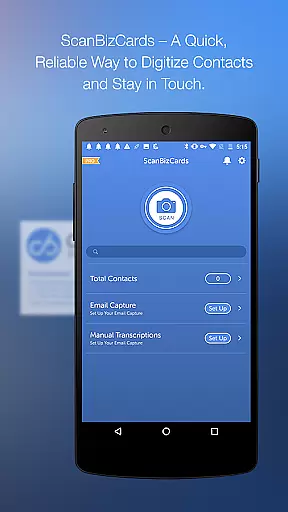
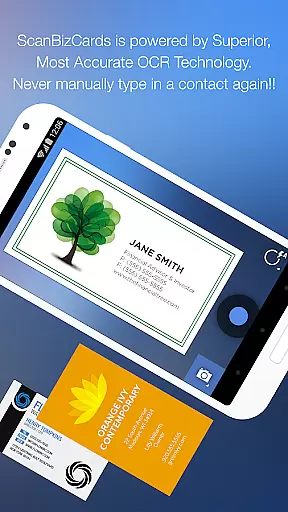
ScanBizCards Premium is a versatile business card management app for Android users. It allows you to digitize and organize your physical business cards by simply taking photos of them. The app offers advanced OCR technology that ensures accurate scanning, making it 5x faster than previous versions. Additionally, the app supports batch scanning, enabling users to scan multiple cards at once, which is particularly useful after networking events or conferences.
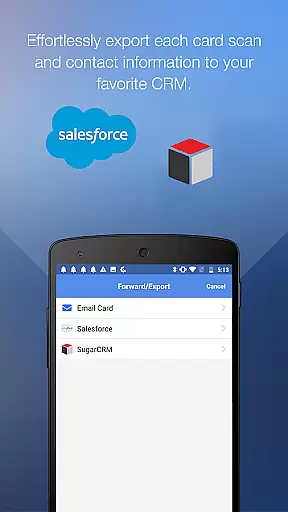
Beyond basic scanning, ScanBizCards provides seamless integration with major CRM platforms like Salesforce and SugarCRM. This feature allows sales professionals to export scanned contacts directly into their CRM systems, ensuring their databases remain up-to-date. For U.S. users, there's an exclusive feature that captures email signatures and updates contacts automatically. With support for 22 languages, this app is ideal for international use, offering flexibility and efficiency in managing professional contacts.
ScanBizCards Premium stands out due to its comprehensive feature set tailored for business professionals. One of its key features is the ability to submit scanned cards for 100% accurate human transcription, ensuring no detail is missed. Users can also create personal notes for each card and organize them using custom folder names, enhancing personal productivity and information retrieval.
The app includes unique functionalities such as scanning conference badges and capturing contacts from email signatures, streamlining the process of updating and expanding your network. Furthermore, ScanBizCards offers a 3D gallery view mode, allowing users to visually browse through their collection of digital cards. With capabilities like double-sided card scanning and exporting to various CRMs, this app caters to diverse professional needs while maintaining ease of use and reliability.
In the realm of collaborative work, ScanBizCards Premium emerges as a pivotal tool for teams aiming to streamline their contact management processes. The app facilitates seamless integration with major CRM platforms such as Salesforce and SugarCRM, allowing teams to effortlessly export business contacts. This ensures that every team member has access to up-to-date contact information, which is crucial for coordinated sales efforts and marketing campaigns.
Moreover, the latest update introduces an enhanced Email Signature Capture feature compatible with Gmail and Outlook. By connecting their email accounts, users can automatically capture new contacts from email signatures, thus enriching the shared database with minimal manual input. This functionality not only saves time but also reduces the risk of human error in data entry, making collaborative projects more efficient.
The ability to batch scan multiple business cards adds another layer of collaboration efficiency. Teams attending conferences or trade shows can quickly digitize stacks of business cards and export them directly into their CRM systems. With this feature, converting new leads into actionable contacts becomes significantly faster, enabling teams to focus more on nurturing relationships rather than managing paperwork.
Effective task management is at the core of ScanBizCards Premium's design, empowering users to maintain meticulous control over their professional networks. The app offers robust tools for organizing scanned business cards through custom folder names and personal notes, ensuring that each contact is easily retrievable when needed. Such organization capabilities are essential for managing tasks related to follow-ups and networking activities.
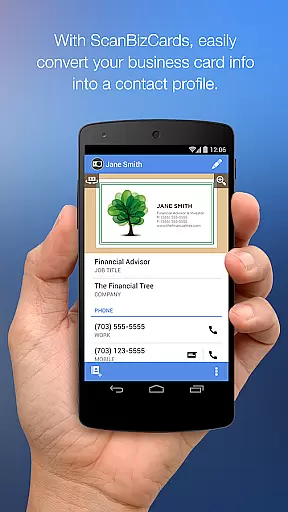
Additionally, the app provides advanced editing options where users can review and modify contact details side-by-side with the original business card image. This precision in task execution ensures that all contact information remains accurate and up-to-date, which is vital for successful communication and relationship building. Users can also create new contacts or merge duplicates within their address book, streamlining their network management process.
Furthermore, ScanBizCards supports exporting contacts to various CRMs like Salesforce, offering unlimited exports for U.S. users who connect their email accounts. This feature enhances task management by keeping CRM databases current without any monthly limitations on exports. As a result, professionals can manage their tasks more effectively, knowing that their CRM reflects the most recent interactions and connections made during business events or meetings.
Accurate OCR scanning
Batch scanning option
CRM integration
Email signature capture
Multi-language support
Premium version costly
Limited free exports
Occasional OCR errors
Heavy on storage
Learning curve for new users

Find jobs and make money fast with JobStack.
 4.60
4.60
Earn free swag, G-Cards & food • Enter sweepstakes • Find stores • So much more.
4.70
Manage Your Shop
4.70
Find work, shifts and gigs near you. Jobs lasting a few hours to a few months.
4.30
Recover what matters — quickly and easily.
4.70
enjoy effortless PDF reading anytime, anywhere
3.90
All your team communication in one place
4.70
Make invoices, bills, receipts & estimates on the go with Invoice Generator.
4.70
The app that lets you deliver with Amazon.
4.50
BuildCalc - the easiest AND the most advanced construction calculator app.
4.80
Employee Management Made Easy
4.80
Permission Guard is a security app that helps you manage app permissions.
4.80
The MyWalmart App is available for all associates in stores.
4.70
Find the right fit, faster.
4.70
The revolutionary flexible staffing platform
4.40
The Penny Puss app with DG penny finder
4.10
Quickly open and manage PDF files on your device.
3.80
We are a dynamic team of creatives people of design, marketing, web & apps
3.00
viewing and sharing PDFs and other files—anytime, anywhere!
4.1


User Reviews