

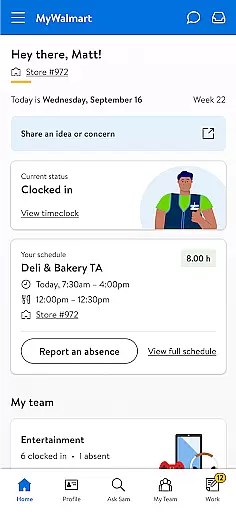
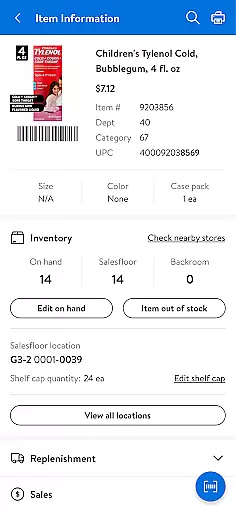
MyWalmart is a comprehensive business application designed to enhance the work experience for Walmart associates while providing potential candidates with essential information about career opportunities. The app serves as an all-in-one platform that allows users to explore Walmart's rich history, understand its cultural values, and learn about the benefits offered by the company.
For current employees, MyWalmart offers powerful internal features such as schedule management, Ask Sam - a voice assistant for answering work-related queries, team communication tools, and an inbox for important notifications. These functionalities streamline daily operations and improve workplace efficiency.
Whether you're looking to apply for a job at Walmart or seeking to optimize your current role within the company, MyWalmart provides valuable resources and tools to support your journey. Its user-friendly interface ensures easy navigation, making it simple to access the information you need quickly and efficiently.
MyWalmart stands out with its diverse range of features tailored specifically for both potential and current Walmart associates. One of the key highlights is the robust schedule management system, which enables users to view their work schedules, request time off, and even swap shifts with colleagues seamlessly.
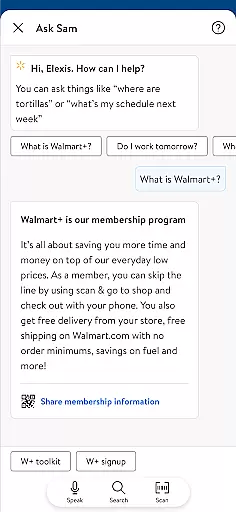
The innovative Ask Sam feature acts as a personal search and voice assistant, capable of answering questions related to products, metrics, and more. This AI-powered tool becomes smarter with each interaction, ensuring accurate and relevant responses over time. Additionally, the My Team functionality provides a roster view of coworkers on shift, complete with an in-app walkie-talkie feature for instant communication.
Another notable aspect is the centralized Inbox, where users can receive notifications and take actions regarding scheduling, time-off requests, and other important updates. While some advanced features require two-step verification and may not be available in all locations, the overall package offers a sophisticated solution for managing various aspects of work life at Walmart.
Collaborative work features are essential for modern business applications, enabling seamless teamwork and communication. MyWalmart app excels in this area by offering tools specifically designed to enhance associate collaboration.
The app's 'My Team' feature provides a roster view of working associates, complete with an in-app walkie-talkie function. This allows team members to stay connected in real-time, facilitating quick communication and coordination among staff. The integration of voice and messaging capabilities directly within the app creates a centralized platform for team interaction.
Additionally, the 'Ask Sam' feature serves as a smart search and voice assistant. It not only answers product-related queries but also learns from each interaction, becoming more intelligent over time. This collaborative knowledge base helps associates solve problems faster and share information more effectively.
These features collectively create a robust collaborative environment that streamlines operations, improves response times, and fosters better teamwork across Walmart locations. The combination of real-time communication tools and intelligent assistance significantly enhances workplace productivity.
Effective task management is crucial for maintaining operational efficiency in large organizations. MyWalmart addresses this need through comprehensive scheduling and organizational tools that help associates manage their work commitments effectively.
The app's Schedule feature allows users to view their work schedules, request time off, and manage shift swaps or pickups. This functionality extends beyond basic calendar viewing by enabling proactive management of work hours and availability. Associates can easily adjust their schedules based on personal needs while ensuring adequate coverage for their department.
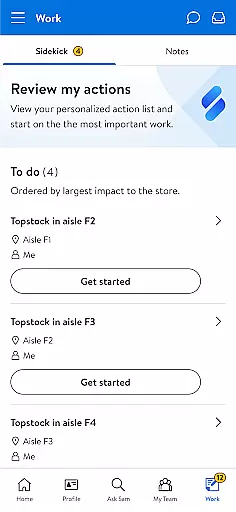
Furthermore, the Inbox feature consolidates all notifications and actions related to scheduling and time-off requests. This unified system ensures that important messages don't get overlooked and that necessary actions are promptly addressed. The organized presentation of tasks helps users prioritize their responsibilities efficiently.
By integrating these task management features, MyWalmart empowers associates to take control of their work schedules while maintaining operational consistency. The result is improved time management, reduced administrative burden, and enhanced overall productivity across Walmart's workforce.
User-friendly interface
Comprehensive scheduling tools
AI-powered voice assistant
Real-time team communication
Centralized notification system
Limited availability of features
Requires two-step verification
Location-based restrictions
Potential learning curve
Dependent on internet connection

AI-powered document scanner with auto enhance for perfect PDFs.
 4.60
4.60
Quickly open and manage PDF files on your device.
3.80
Windows App allows you to connect to remote PCs and virtual apps.
3.70
Find the right fit, faster.
4.70
Amazon A to Z is the place to manage your work-life at Amazon.
4.50
Use Generative Summary to understand your rental or insurance docs in seconds.
4.70
We are a dynamic team of creatives people of design, marketing, web & apps
3.00
Say hello to the mobile work experience built to help you thrive at work.
4.30
The app that lets you deliver with Amazon.
4.50
Permission Guard is a security app that helps you manage app permissions.
4.80
Get instant construction estimates: accurate home repair & material calculator.
4.70
Access to Paylocity, empowering employees with information they need 24/7.
4.70
Make invoices, bills, receipts & estimates on the go with Invoice Generator.
4.70
Ask Accio anything about business. Alibaba-backed, built by experts, not just AI
4.60
Paychex Flex - Save Time and Stay Connected
4.60
Ship, Track, Find a Location or Get a Quote with UPS. Anytime. Anywhere.
4.60
From Gone to Back Again — In Just a Few Taps
4.50
Scan Business Cards & Conference Badges - Capture Leads at Events & Tradeshows
4.20
FX Plus adds media, networking, and cloud capabilities to FX File Explorer.
4.10


User Reviews