
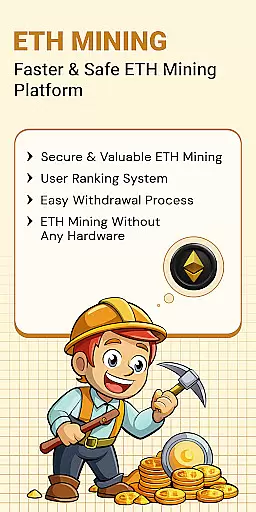
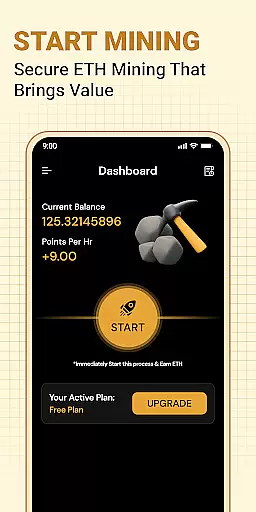
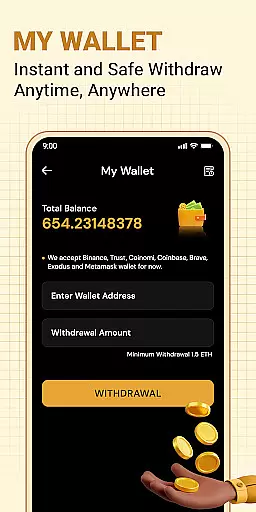


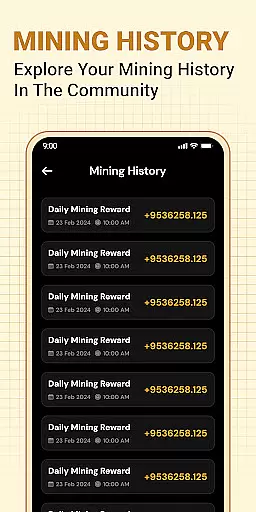
ETH Cloud Miner is an innovative app designed for users who want to monitor their Ethereum cloud mining activities conveniently. The core functionality revolves around providing real-time data on mining performance, including hashrate, uptime, and estimated daily rewards. This allows users to stay informed about their mining operations without needing physical hardware.
Apart from tracking essential mining stats, the app also offers a user-friendly dashboard that displays session data and account performance. It connects seamlessly with supported cloud mining providers, ensuring that all information is accurate and up-to-date. Whether you're new to cryptocurrency or an experienced miner, this app provides valuable insights into your Ethereum mining activities.
This app is particularly useful for those who are already using third-party cloud mining services. By offering a mobile solution to view mining stats anytime and anywhere, ETH Cloud Miner enhances accessibility and control over your mining investments, making it easier to manage and optimize your mining strategy.
One of the standout features of ETH Cloud Miner is its ability to display live mining information without utilizing the device's CPU or GPU. All mining processes occur on remote servers, ensuring that your phone’s resources remain unaffected. This makes the app both efficient and easy to use.
The app includes several key functionalities such as viewing hashrate, monitoring mining sessions, and checking uptime statistics. Users can also estimate their daily rewards, which helps in planning and strategizing their mining activities better. Additionally, the app provides a seamless login process that connects directly to your cloud mining provider, simplifying data retrieval.
Another notable feature is the app's lightweight design, which ensures smooth performance without draining your device’s battery. With a focus on real-time updates and ease of access, ETH Cloud Miner stands out as a reliable tool for anyone involved in Ethereum cloud mining.
Task creation and detail customization are essential features for users who need to manage their Ethereum mining activities effectively. This functionality allows users to set up specific tasks related to their cloud mining operations, ensuring they can monitor and adjust their strategies as needed.
The ETH Cloud Miner app enables users to create detailed tasks that correspond to various aspects of their mining performance. For instance, users can establish tasks to check their hashrate at regular intervals or set notifications for when their estimated daily rewards reach a certain threshold. These tasks help streamline the monitoring process and ensure users stay informed about critical changes in their mining activity.
By offering extensive customization options, the app empowers users to tailor each task to their unique requirements. Users can specify parameters such as frequency, conditions, and notification preferences, making the app a versatile tool for managing cloud mining operations efficiently.
Ultimately, this feature enhances user engagement by providing a personalized experience that aligns with individual mining goals. By leveraging task creation and customization, users can optimize their Ethereum mining strategies and achieve better outcomes.
Reminder settings play a crucial role in keeping users engaged and informed about their Ethereum mining activities. With the ability to configure reminders, users can ensure they never miss important updates or changes in their mining performance.
In the ETH Cloud Miner app, reminder settings allow users to set up alerts for various events related to their cloud mining operations. Whether it's a drop in hashrate, an increase in estimated daily rewards, or a change in uptime status, users can receive timely notifications that prompt them to take action.
This feature is particularly beneficial for users who want to maintain optimal mining efficiency. By configuring reminders based on specific thresholds or time intervals, users can quickly address any issues that may arise and make necessary adjustments to their mining strategy.
Overall, reminder settings contribute to a more proactive approach to managing cloud mining activities. They empower users to stay ahead of potential challenges and capitalize on opportunities, ultimately leading to a more successful and rewarding mining experience.
User-friendly interface
Real-time mining data
No device resource usage
Seamless provider integration
Lightweight and efficient
Limited to cloud miners
No direct mining capability
Third-party dependent
Premium features may cost extra
Requires existing mining account

Clubs, Festivals, Discounted Tickets, Guest Lists & VIP Tables
 4.90
4.90
Create invitation cards for birthdays, weddings, Christmas and more.
4.80
Instant photo sharing for every occasion
3.80
The official app of the Carmel Christkindlmarkt!
4.4
RAISE-365 makes fundraising easy and fun!
3.20
TV Garden - World Live TV : Play & cast your videos seamlessly!
3.20
Octrober 2025: We've updated the MyGenMobile App with a new look and feel!
4.40
Find Live Event Ticket Deals to Sports, Concerts, Festivals, & Comedy For Less!
4.80
Save money on concert, sport, and theater tickets, and discover upcoming events.
4.80
Find EDM shows near you! See your favorite artists live, and discover new music.
4.90
Beautiful invitation cards + easy RSVP tracking for any event. Design Invites.
4.80
Discover events & experiences in NYC, LA, Chicago, DC, Miami and more!
4.70
Wedding planner app with wedding venues, wedding checklist, countdown & budget.
4.60
The world's largest selection of tickets is now at your fingertips
3.90
Buy tickets for any event!
3.90
Create Birthday Cards in Birthday Invitation Maker and Birthday Card Creator App
3.00
An App for Bhutanese
4.3
The Official App
4.0
Some connections are better kept private
4.1


User Reviews