
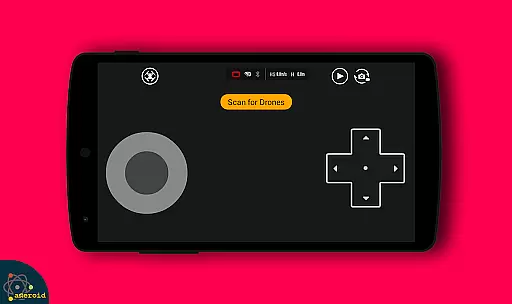
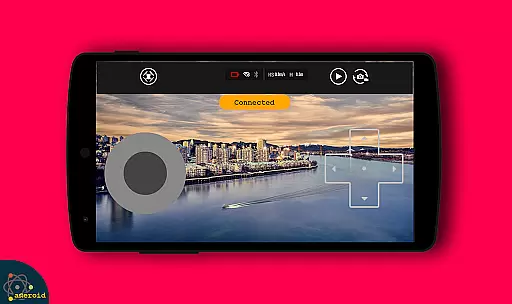
Drone Remote Control is an innovative application that transforms your Android smartphone into a powerful remote control for drones. Designed for drone enthusiasts, this app allows users to easily configure and operate various drone models with the same functionality as traditional RC controllers.
The app supports key drone operations including flight planning, automated takeoff and landing, live FPV streaming, and camera controls. Its intuitive interface makes it simple to capture images, record videos, and maintain uninterrupted flights for mapping large areas. Drone Remote Control works seamlessly with latest drone models, providing a comprehensive solution for both recreational and professional drone pilots.
Whether you're looking to control your own drone or manage multiple units, this application offers the flexibility and convenience of smartphone-based drone management. The ability to disable auto-flight and resume manual control ensures maximum safety and operational control during flights.
Drone Remote Control stands out with its comprehensive feature set designed for modern drone operations. The application enables users to create detailed flight plans on any device, while supporting automated flight sequences including takeoff, image capture, and landing procedures.
A key innovation is the live First Person View (FPV) streaming capability, allowing operators to experience real-time video feeds from their drones. The app maintains professional-grade control features such as video recording with adjustable FPS settings, WiFi camera integration, and seamless media capture functions.
Advanced functionalities include uninterrupted flight sessions for large area mapping, single-tap auto-flight disabling, and complete camera control through the smartphone interface. These features make it an essential tool for both hobbyists and commercial drone operators seeking enhanced control capabilities.
Functionality completeness in a drone remote control app is crucial for ensuring that users can fully operate their drones without limitations. Drone Remote Control offers an extensive range of features, including the ability to make flight plans, automate takeoff and landing, and live stream First Person View (FPV). These capabilities ensure that users have comprehensive control over their drones, replicating the functionalities of a physical remote.
The app's coverage spans across various drone models, making it versatile and adaptable to different hardware specifications. It supports the latest drones, providing compatibility with devices that have advanced features such as video capture and FPV streaming. This broad compatibility ensures that whether you're flying a quadcopter or another model, you'll be able to utilize the app effectively.
Users benefit from this wide functionality coverage by experiencing seamless drone operation through their smartphones. The intuitive interface allows even beginners to configure and use the app easily, mimicking the familiar controls of traditional RC remotes. With Drone Remote Control, managing your drone becomes not only convenient but also enhances the overall flying experience.
Usability and operational smoothness are vital for any application, especially one that serves as a remote control for drones. Drone Remote Control excels in delivering a user-friendly experience by offering straightforward navigation and easy configuration options. Users can quickly set up flight plans on any device, ensuring that they spend more time flying and less time troubleshooting.
Operational smoothness is evident in how the app handles complex tasks effortlessly. For instance, automating takeoff, flight, image capture, and landing processes demonstrates the app's ability to streamline operations. Additionally, features like disabling auto-flight and resuming manual control with a single tap highlight its responsive design, which caters to both novice and experienced pilots.
By prioritizing usability and operational efficiency, Drone Remote Control provides a reliable tool for drone enthusiasts. Its ability to connect to WiFi camera devices for live viewing, picture-taking, and video recording adds another layer of convenience. Overall, these attributes contribute to a smoother, more enjoyable drone piloting experience, making it an essential app for anyone passionate about drone technology.
User-friendly interface
Comprehensive drone control
Live FPV streaming
Automated flight features
Free to use
Not compatible with older hardware
Limited physical controls
Requires stable connection
Dependent on device performance
No advanced calibration tools

View your cameras anywhere and anytime
 4.20
4.20
Connect your phone to any endoscope camera, USB camera, or borescope with ease.
3.70
Identify securely online
3.10
A great tool help you to format Micro SD memory Card
3.10
TV USB connector app provides you a seamless cast option from your phone to tv.
4.70
Enjoy hours of entertainment with our Roblox mobile games app
4.5
Recite Quran Majeed القران with special 16 line real Kuran page in hand
4.30
Mirror Link Car Display to share your screen with car dashboard wirelessly
4.1
Phone Software Update Quick Checker helps you to keep your phone apps up to date
4.50
Explore The Holy Quran Majeed for Muslim. Listen to MP3 Quran & Al Quran Kareem.
4.80
The Free Catholic Latin American Bible in complete Spanish
4.60
Al QURAN-القرأن الكريم app to read Quran offline just like an actual Quran book
4.30
a wireless controller that provides a seamless and gaming experience for players
3.80
Mirror link car connector to share your screen with car dashboard
3.80
With Endoscope Camera Connector you can connect your phone with endoscope cam
3.70
Mobile Connect To TV - HDMI USB & WiFi Screen Mirroring
3.70
Mobs maker Minecraft help MCPE creators make their own mob by using Blockbench
3.50
Experience virtual reality on your smartphone with Cardboard.
3.50
Connect and Find your smart tag via our app.our app is compatible with smarttag.
3.30


User Reviews