
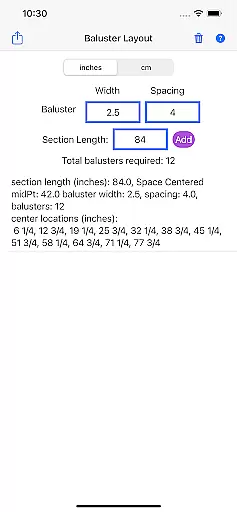
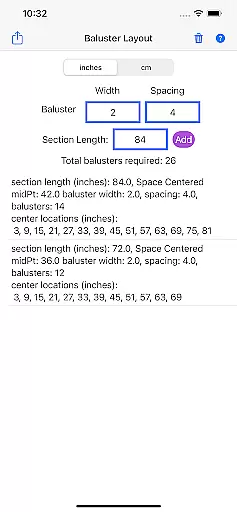
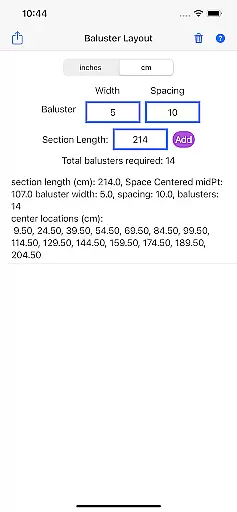
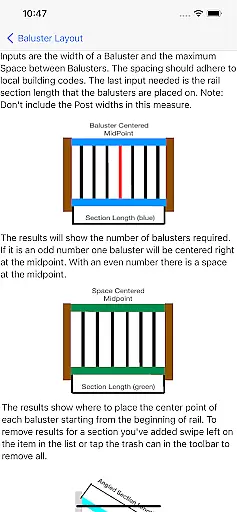
Baluster Layout is a specialized application designed for deck and stair builders, providing an efficient solution for calculating baluster spacing. The app's core functionality lies in its ability to determine the precise number of balusters needed and their exact placement to comply with building codes. Users simply input the railing length, baluster width, and desired spacing, and the app performs the necessary calculations.
One notable feature is its support for projects with multiple railing sections, each having unique dimensions. This makes it suitable for both simple and complex projects. Additionally, users can choose between inches or centimeters, offering flexibility to match project specifications. Whether you're a professional builder or a DIY enthusiast, Baluster Layout ensures that your structures are not only visually appealing but also code-compliant, saving time and reducing the risk of errors.
Baluster Layout offers several key features that enhance its usability and effectiveness. First and foremost is the precision spacing calculator, which ensures that all balusters are spaced correctly according to building code requirements. This eliminates the need for manual calculations, thereby saving time and reducing the likelihood of errors.
Another significant feature is the app's ability to handle multiple rail sections. Each section can have its own unique dimensions, allowing users to manage complex projects effortlessly. Furthermore, the app provides unit flexibility, supporting both inches and centimeters. This ensures that users worldwide can utilize the app according to their specific needs. Lastly, detailed results are provided, giving users a comprehensive breakdown of the number of balusters required for each section and their exact placement, ensuring accuracy and compliance.
In the realm of home improvement and construction, having reliable information is crucial. Baluster Layout provides accurate calculations for baluster spacing, ensuring that all data entered into the app meets specific building code requirements.
By inputting details such as railing length, baluster width, and desired spacing, users receive precise results tailored to their project's needs. This meticulous attention to detail guarantees that each baluster placement complies with safety standards, offering peace of mind to both professionals and DIY enthusiasts.
The appu2019s commitment to accuracy extends beyond simple calculations; it offers comprehensive breakdowns for projects involving multiple rail sections, each with unique dimensions. This ensures that every part of your structure adheres to regulatory guidelines, enhancing overall safety and compliance.
Baluster Layout goes beyond basic calculation tools by incorporating features that streamline the entire baluster installation process. One standout feature is its ability to handle complex projects involving multiple railing sections, providing detailed results for each section individually.
Users can choose between inches or centimeters, accommodating various project specifications and international standards. This flexibility makes the app versatile and suitable for a global audience, ensuring that measurements are always accurate regardless of regional differences.
Additionally, the app helps avoid costly mistakes by delivering clear guidance on meeting building code requirements. By saving time and eliminating manual calculations, Baluster Layout allows users to focus on creating visually appealing structures while maintaining strict adherence to safety protocols.
Time-saving
Code-compliant
User-friendly
Flexible units
Detailed results
Limited to balusters
No 3D visualization
Basic interface
Few customization options
Requires manual input

Unlock AI-based barcode scanning and support the development of Grocy Android
 4.4
4.4
PRO Version of GLB AR Viewer
4.0
Control your Daikin, Amana & Goodman heating & cooling systems from anywhere
4.40
This Fire TV Remote control's your Fire TV Device and Insignia Fire TV Remote
3.70
Plants, Beauty, Collectibles
4.60
AI Home Designer & Room Planner: Decorate your interior space with AI
4.40
Your guide to apartments & rental homes. Find your next place to rent with AG.
4.60
Real estate app to find homes for sale or rent in the right neighborhood for you
4.70
Find your next home, house, apartment, condo, casa, flat, rental, studio, or bed
4.70
Search for Homes, Rentals, Agents & Schools
4.70
Find homes for sale and apartments for rent in the best neighborhood.
4.70
Looking for the perfect apartment finder app? Find beautiful rental homes here!
4.60
Rent on-the-go with TurboTenant’s app made just for renters
4.50
Control the scent and ambiance of your home and car, right from your phone.
4.50
Fire & Power Safety
4.50
Set up your devices, customize settings, and monitor your home—from anywhere
4.40
Design your dream home with 3D planning app, Visualize your dream home in 3D.
4.20
Floor Plan Creator Home Design with 2D interior design and 3d view.
3.90
An easier way to make payments and maintenance requests from anywhere.
3.50


User Reviews