
AutoPad is a versatile ambient pad loop application designed to enhance live performances and recordings with seamlessly looped sample-based drones. The app provides subtle structure and tasteful soundscapes that can be triggered instantly and played for as long as needed. With natural crossfades between keys handled automatically, AutoPad ensures smooth transitions during performances.
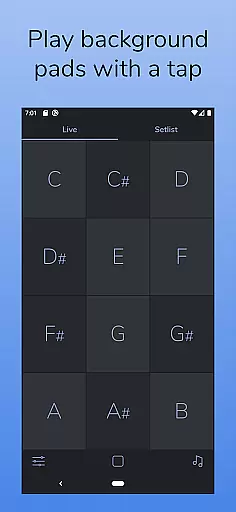
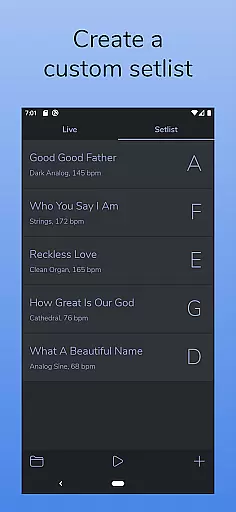
The app comes equipped with two distinct modes - LIVE mode for instant access to all twelve keys, and SETLIST mode for creating custom song lists. It also features a built-in metronome, MIDI support (with physical controllers), and a dark color scheme optimized for stage use. AutoPad's sounds are crafted to complement live musicians by providing soft, continuous backing in major or minor contexts.
Whether used in worship music or other live settings, AutoPad offers an easy-to-use solution for adding professional-quality ambient layers to any musical performance. Its intuitive design and customizable options make it suitable for both amateur enthusiasts and professional musicians alike.
AutoPad stands out with its comprehensive feature set tailored specifically for musicians. The app includes two primary modes: LIVE mode, which grants immediate access to all twelve musical keys, and SETLIST mode, allowing users to create customized playlists for performances. This dual-mode functionality caters to different performance needs and preferences.
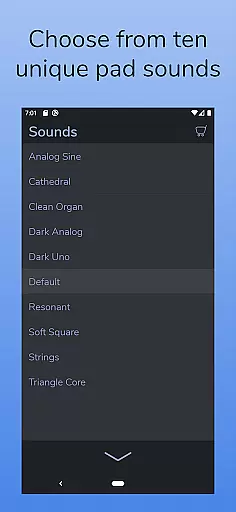
With ten meticulously designed pad sounds included, each offering unique atmospheres across all twelve keys, AutoPad delivers diverse sonic possibilities. Users can further expand their library through in-app purchases or by importing personal WAV files (Android version only). The built-in metronome helps maintain timing precision without additional equipment.
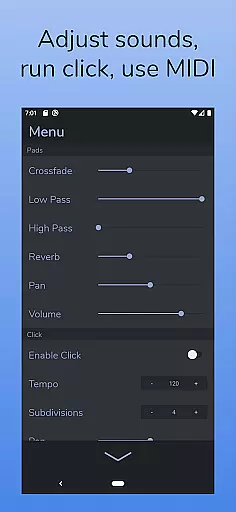
Additional features include adjustable crossfade times, dual filters, reverb control, pan settings, and volume adjustments accessible via the main menu. MIDI compatibility enables external keyboard triggering, while the visually appealing dark theme ensures optimal visibility on stage. These robust capabilities position AutoPad as a powerful tool for enhancing live music experiences.
AutoPad offers a rich and diverse music library that caters to various ambient sound needs. With 10 carefully designed pad sounds included, each provides a unique atmosphere across all 12 musical keys.
The app also supports expansion of the sound library through in-app purchases or by importing personal WAV files, ensuring users have access to a wide range of high-quality audio content.
While the Android version currently only supports WAV files, this does not detract from the authenticity and legal use of the music provided, giving users peace of mind when using these sounds in their projects.
AutoPad ensures top-notch audio quality with natural crossfades between keys, handled automatically to maintain an uninterrupted soundscape during live performances and recordings.
Users can further refine their audio experience with controls over crossfade time, two filters, reverb amount, pan, and volume found within the app's menu, allowing for personalized sound customization.
Additionally, AutoPad's responsive design to MIDI controllers means that musicians can trigger pads with a keyboard, providing flexibility and precision in crafting their desired audio environment.
User-friendly interface
Versatile sound options
Seamless key transitions
Customizable settings
Stage-friendly design
Limited file format support
No virtual MIDI on Android
In-app purchases required
Complex for beginners
Specific use case focus

Simply convert wav to mp3. Clear. Reliable. Safe.
 4.4
4.4
Save hundreds of dollars for a physical strobe tuner and instead use this app.
4.50
Your song collections with lyrics and chords on Android smartphones and tablets.
4.80
The only true audiophile music player with Hi-Fi audio rendering and DSP engine
3.90
Advanced 10-Band Audio Graphic Equalizer Sound Booster Pro
4.30
No wifi music app. Mp3 offline. Tuner radio, young radio music. Music downloader
4.20
Powerful 10-Band equalizer pro with sound booster improves Android audio quality
4.30
Responsive piano with great sounds, graphics, and songs
4.80
Be a true music maker: create beats, mix and make music like a real DJ!
4.30
Tune in to the greatest hits on UK Radio | The home of Capital, Smooth & Heart.
4.90
Voice recorder - Audio recorder. Best recorder for recording
4.90 4.70
4.70
Enhance the sound quality of your devices, listen to what you want
4.50
Visualize the guitar fretboard, master scales & play through changes like a pro!
4.50
Guzheng Master supports many playing techniques as an acoustic Guzheng
4.50
Turn your phone into a musical instrument from the future!
3.90
Powerful beat maker & DJ mixer to remix tracks, make music, & perform DJ mix
3.70
The Cubase remote control app
3.60
Remove ads permanently from Music Visualizer
4.2


User Reviews