
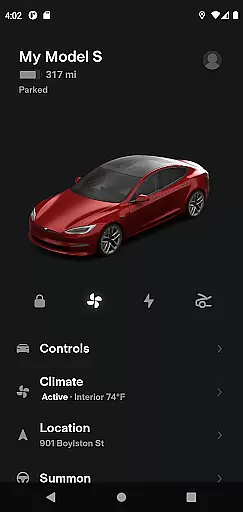
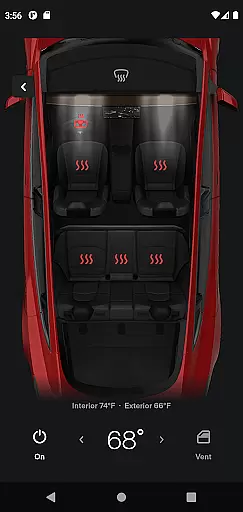
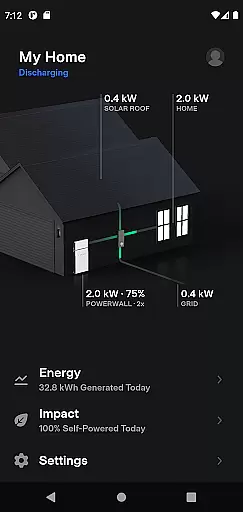
The Tesla app is a comprehensive lifestyle tool that allows vehicle owners to maintain constant communication with their Tesla cars and Powerwalls. This application provides real-time control over various vehicle functions, including charging management, climate control, security features like locking and unlocking, and location services. Additionally, users can interact with their Powerwall 2 systems, monitoring energy storage and usage. The app's ability to enhance convenience and efficiency makes it an essential companion for Tesla owners.
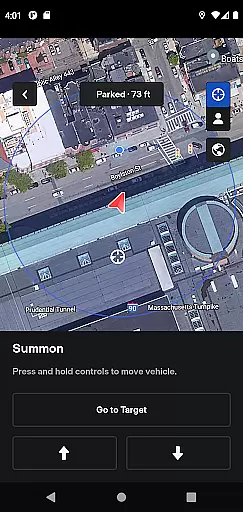
One of the standout features is the remote vehicle management capability, which lets you prepare your car for driving by adjusting temperature settings or even summoning it from a parking space. These functionalities not only improve user experience but also add a layer of luxury and innovation to everyday vehicle interactions.
Tesla app offers a wide array of features designed to provide maximum control and convenience. Users can check the charging progress in real time and manage the charging process remotely. The app also allows for pre-conditioning the car's climate control system, ensuring comfort before driving. Security features include remote lock and unlock capabilities, along with the ability to locate the vehicle using GPS.
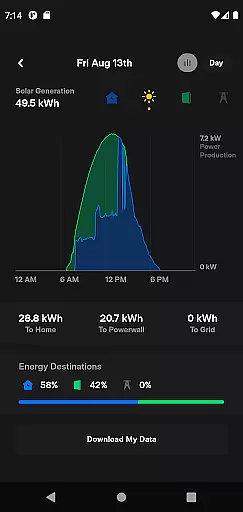
For entertainment and ease of use, passengers can control media playback directly from the app. Vehicle maintenance is simplified with over-the-air software updates, ensuring that your Tesla always has the latest features and improvements. Powerwall integration allows users to monitor solar energy production, home energy consumption, and grid export, providing a holistic view of their energy ecosystem.
The Tesla app offers an extensive range of features that cater to various aspects of a modern, tech-savvy lifestyle. With functionalities ranging from vehicle control to energy management, it ensures users have comprehensive tools at their disposal.
From climate control and charging management to remote locking and media control, the app provides diverse capabilities that align with different user needs. This broad spectrum of services makes it an essential companion for Tesla owners looking to maximize their vehicle's potential.
Additionally, the integration with Powerwall adds another layer of utility, allowing users to monitor solar energy storage and usage. This holistic approach to lifestyle management sets the Tesla app apart as a versatile tool for both vehicle and home energy solutions.
Authenticity and credibility are paramount in the Tesla app, ensuring users receive accurate and reliable information about their vehicles and energy systems. The data provided is directly sourced from Tesla's secure servers, guaranteeing precision and trustworthiness.
Each feature within the app is developed based on expert engineering knowledge, reflecting Teslau2019s commitment to quality and innovation. Users can confidently make decisions regarding their vehicle's status and energy consumption, knowing the information is vetted by professionals.
Furthermore, regular software updates enhance the app's functionality and security, maintaining its position as a credible source of information and control for Tesla owners. This dedication to accuracy and expert validation reinforces user trust in the app's capabilities.
User-friendly interface
Comprehensive vehicle control
Remote software updates
Energy monitoring
Enhanced security features
Requires internet connection
Limited to Tesla vehicles
Powerwall 2 required for energy features
Dependent on vehicle compatibility
Potential privacy concerns

Get roadside help, discounts, travel tools & more — AAA is with you everywhere.
 4.80
4.80
Unique informative Dial with Live Moon Phase at a glance!
3.60
Earn points with every purchase with Moe Rewards.
4.20
Designed to delight, impress and energize your festive spirit every single day
4.2
Take Hobby Lobby with you wherever you go!
3.40
Smart home security protection
3.20
Wear your favorite memories, loved ones, pets or travel photos on your watch
4.0
The Wyze app is your gateway to a smarter life and a safer home.
4.40
Create slime on your phone and enjoy satisfying and relaxing ASMR games
4.50
Have your Tehillim with you at all times
4.70
Chat, meet genuine singles in your area. Real connections start with being real.
4.30
Paranormal Spirit Bell Trigger Device
4.30
Share opinions, get paid cash
4.30
Connect to your Shark ROBOT™ from anywhere using the SharkClean™ App.
3.60
An Eerie Musical Trigger Toy for Spirits to Play with!
3.50
LineLearner, the quick way to learn lines.
2.90
Big bold weather watch face with dynamic backgrounds and 3 complications
4.5
Unique Dark Analog style for Wear OS watches.
4.5
Bring the warm colors of fall directly to your wrist with Autumn Leaves!
4.3


User Reviews