
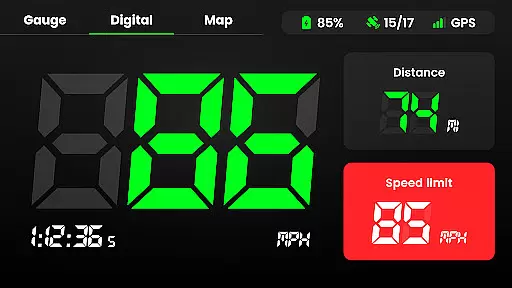
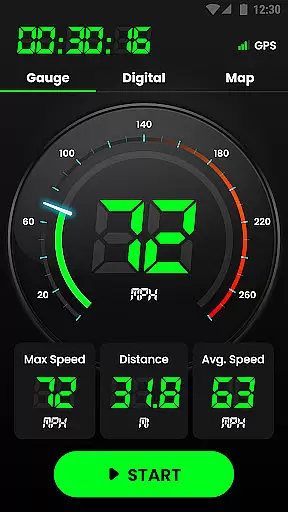
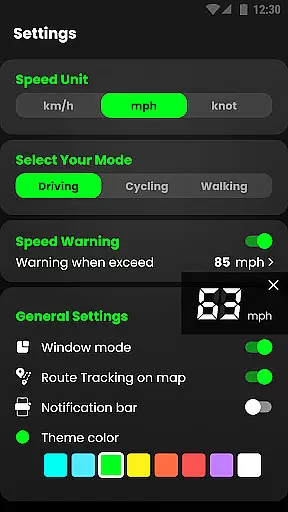
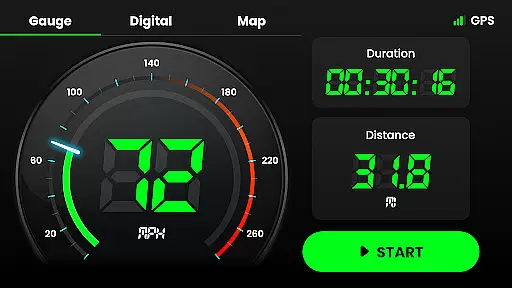
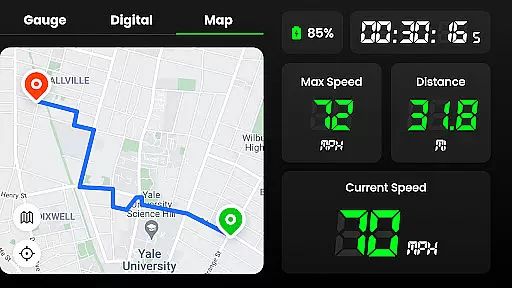
Speedometer is a highly accurate GPS-based speed tracking application designed to measure the velocity of various modes of transportation. Whether you're driving a car, riding a bicycle, or even jogging, this app provides real-time speed updates and location tracking. The app features both digital and analog displays, allowing users to view their current speed and distance traveled in multiple units such as kilometers per hour (km/h), miles per hour (mph), and knots. Its offline functionality ensures that users can rely on it even in areas with poor internet connectivity.
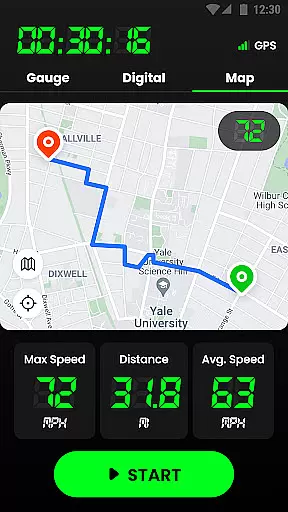
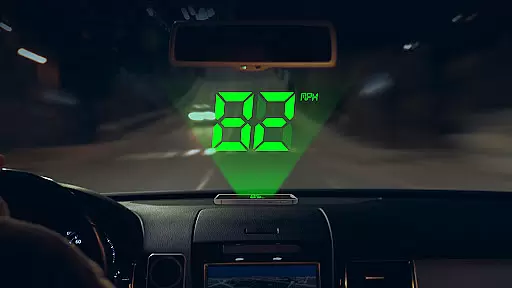
In addition to its core speed-tracking capabilities, Speedometer offers advanced features like speed limit alerts, which notify users when they exceed predefined thresholds. The head-up display (HUD) mode projects your speed onto your car's windshield for easy viewing while driving. With GPS navigation, users can track their routes, monitor trip statistics such as average and maximum speeds, and review historical travel data. This makes the app not only a speedometer but also a comprehensive odometer and journey tracker.
Whether you're commuting daily or engaging in recreational activities like cycling or running, Speedometer ensures that you stay informed about your speed and location. It is particularly useful for those who want to replace an inaccurate vehicle speedometer or simply need a reliable tool to track their performance across different activities. With its intuitive interface, customizable settings, and small app size, Speedometer is optimized for both usability and battery efficiency.
Speedometer stands out due to its rich set of features tailored for precision and convenience. One of its key highlights is the dual-mode display, offering both digital and analog interfaces. Users can switch between these modes depending on their preference, making it versatile for different scenarios. The app also supports multiple speed units—kilometers per hour (km/h), miles per hour (mph), and knots—allowing users to customize their experience based on regional standards or personal preference. Additionally, the HUD mode mirrors the speedometer display onto your car's windshield, providing a safer way to monitor your speed without taking your eyes off the road.
Another standout feature is its ability to function offline. Even in areas with limited or no internet connectivity, Speedometer continues to deliver accurate speed and location data using GPS technology. This offline capability is complemented by the app’s route tracking functionality, which records your journeys and stores detailed information such as starting and ending points, total distance, and average speed. Users can also set custom speed limits, receiving instant notifications via vibrations or audible alerts if they exceed these limits. These safety features make the app especially valuable for drivers who want to avoid speeding tickets or ensure safer driving habits.
Finally, Speedometer includes practical tools like widgets and notification bar support, enabling quick access to essential stats without opening the app. The app also allows users to pause or reset their tracking during a trip, ensuring flexibility for various use cases. With its compact size and minimal impact on battery life, Speedometer strikes a balance between functionality and performance. Whether you're measuring your speed during a morning jog or monitoring your mileage on a long road trip, this app provides all the tools you need in one convenient package.
Map accuracy is essential for any navigation or tracking application, and Speedometer excels in this area. The app uses advanced GPS technology to ensure precise location tracking, whether you're walking, cycling, or driving. This high level of accuracy allows users to have complete confidence in the data provided by the app.
The Speedometer app updates your location in real-time, ensuring that the map reflects your current position with minimal delay. This feature is particularly useful when navigating unfamiliar routes or when precision is critical, such as during competitive sports events. With reliable GPS data, users can focus on their activities without worrying about getting lost or straying off course.
Moreover, the app's ability to function offline enhances its reliability. Users can count on Speedometer to provide accurate mapping information even in areas with poor internet connectivity. This ensures uninterrupted service and peace of mind, knowing that the app remains a trustworthy companion regardless of external conditions.
Route planning is a core component of the Speedometer app, designed to make travel more efficient and predictable. By leveraging sophisticated GPS navigation, the app offers multiple route options, allowing users to choose the most suitable path based on their preferences or current traffic conditions. Whether you need the fastest route or prefer a scenic drive, Speedometer has got you covered.
In addition to offering various route choices, the app provides real-time traffic updates, helping users avoid congestion and roadblocks. This dynamic approach to route planning ensures that you always have the latest information at your fingertips, enabling smarter decision-making while on the move. The estimated time of arrival (ETA) feature further enhances this experience by giving users a clear idea of how long their journey will take.
Speedometer also includes intuitive tools for saving favorite destinations and frequently traveled routes, streamlining future trips. With these personalized route planning capabilities, users can enjoy a seamless navigation experience tailored to their specific needs. Whether commuting daily or embarking on a road trip, Speedometer ensures every journey is as smooth and stress-free as possible.
User-friendly interface
Accurate GPS tracking
Offline functionality
Customizable speed units
Comprehensive trip statistics
Limited free features
Occasional GPS inaccuracies
Ads in free version
Battery consumption
Premium subscription required

TACNAV-X: Precision MGRS navigation, built specifically for the military.
 4.00
4.00
Turn your tablet or Android powered unit into a full blow Android Auto headunit.
2.30
LIRR and Metro-North tickets and trips
4.80
Navigate via GPS Maps of GPS Voice Navigation, driving directions to find routes
3.60
Drive safe with real-time speed camera radar, police, and traffic alerts
3.80
Explore with GPS Navigation with GPS offline, voice GPS, speed camera radar
4.60
Find routes fast with GPS Maps, GPS Navigation & driving directions.
4.10
MapQuest is your go-to app for maps, GPS, voice navigation & live traffic.
3.80
Get route, find shortest path, near by places and weather update
3.90
This app is military GPS coordinate systems helper. (MGRS, UTM & DMS Maps)
4.80
Navigate confidently with our precise Digital Compass app & Direction Compass!
4.70
Rideshare, taxi cabs, and more for your airport travels and everyday trips.
4.50
The fastest and most convenient way to pay for parking on our lots.
4.40
CamSam PLUS - The speed and red light camera warning system!
4.40
Instant diesel discounts - save big with each fill up!
4.40
Navigation, weather, offline maps & tools for smarter, safer travel planning.
4.00
Explore Live Earth Map with 3D World Map & locate cites, mountains real time.
3.80
Explore offline maps with radar, satellite view, and real-time alerts.
3.60
Find 93 Octane Gas: Locate Gasoline Stations Selling Premium 93 Octane or Higher
4.3


User Reviews