
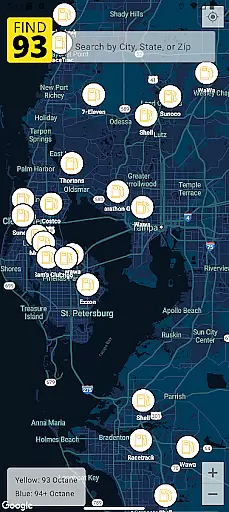

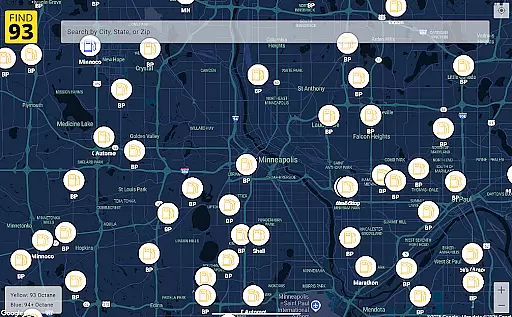
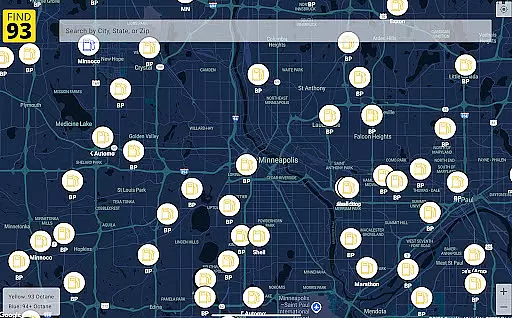
Find93 is a specialized navigation app designed to help drivers locate gas stations that offer 93 octane gasoline or higher. The app's core functionality revolves around its crowdsourced map system, which provides real-time information about premium fuel availability across the United States.
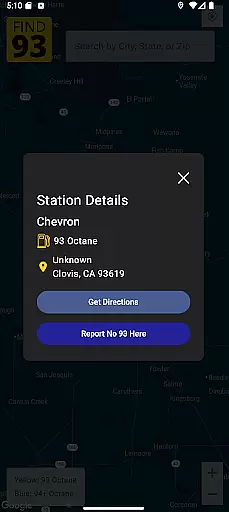
Beyond basic location services, Find93 offers detailed station information including precise addresses, fuel types, and additional descriptions. The app integrates seamlessly with major navigation systems like Apple Maps, Google Maps, and Waze, providing users with multiple routing options to their chosen fueling station.
This application proves particularly valuable for owners of high-performance vehicles and luxury cars that require premium fuel, ensuring they can efficiently plan their refueling stops during both routine commutes and long-distance travels.
Find93 distinguishes itself through several innovative features that enhance the fuel-finding experience. The app's crowdsourced reporting system allows users to actively contribute to map accuracy by reporting stations that no longer carry 93 octane fuel, maintaining up-to-date information for the entire community.
The detailed station profiles provide comprehensive information beyond just location data. Each entry includes specific fuel offerings, complete business details, and user-generated notes about the station's facilities and services. This level of detail helps drivers make informed decisions about their refueling stops.
Find93's navigation integration stands out as a particularly valuable feature. Unlike standard mapping applications, it offers multiple navigation options through direct links to Apple Maps, Google Maps, and Waze, allowing users to choose their preferred routing service while maintaining accurate destination information.
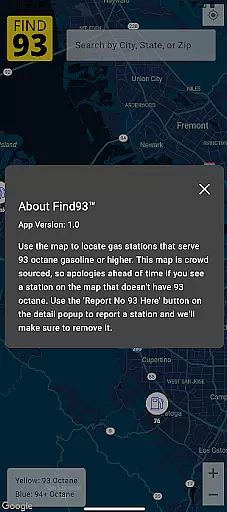
Map accuracy is essential for any navigation app, and Find93 excels in this area by providing users with the most up-to-date information on gas stations that serve 93 octane or higher. Powered by a crowdsourced map, the app ensures that every station's location and details are current and reliable.
The app allows users to report stations that no longer serve 93 octane fuel through a simple tap of the 'Report No 93 Here' button. This feature enables real-time updates and corrections, ensuring that the map remains accurate and trustworthy. With user contributions, Find93 maintains an ever-evolving database that reflects the true status of gas stations.
For drivers who require high-octane fuel, having precise and dependable map data can significantly enhance their travel experience. Find93's commitment to accuracy means users can confidently locate the specific type of fuel they need without unnecessary detours or misinformation.
Effective route planning is crucial when you're on the go and need to find the nearest gas station quickly. Find93 offers seamless integration with popular navigation apps like Apple Maps, Google Maps, and Waze, allowing users to get directions to their selected gas station effortlessly.
Upon selecting a station, users can choose their preferred navigation app to receive optimal routes. This flexibility ensures that drivers can select the best possible path based on real-time traffic conditions and personal preferences, making their journey as efficient as possible.
By incorporating multiple navigation options, Find93 not only simplifies the process of finding high-octane fuel but also enhances overall convenience. Drivers save time and reduce stress, knowing they have reliable tools at their disposal for effective route planning.
User-friendly interface
Real-time updates
Multiple navigation options
Detailed station information
Community-driven accuracy
Limited to premium fuel
Dependent on user reports
No offline functionality
US-focused coverage
Occasional data delays

Find AI powered cameras, ALPRs, and other surveillance infrastructure near you
 4.70
4.70
Start your next adventure confidently using our Accurate Compass App
3.70
Discover over 800 points of interest along the canal.
3.70
Play in the outdoors with Android as your Handheld GPS and offline topo maps!
3.50
Complete offline 1:50k South Island topo map including DOC Hunting Permit Areas
4.60
All of NHSA's trail information at your fingertips for the 2025-2026 season
4.2
NJ TRANSIT information and ticketing at your fingertips
3.70
Off-Roading Navigation App With Trails, Public Lands, & Private Property Info
3.30
GPS phone tracker, family locator, secure location sharing app
4.20
Truck Safe GPS Navigation & Maps: Parking, Fuel, Diesel, Weight Station
4.80
America’s largest public fast charging network, with over 500 charging stations.
4.50
Track accurate speed & distance with GPS Speedometer. Check speed limit & time.
4.50
Turn your Android device into a real off-road GPS using off-line topo maps!
4.40
Find radar maps, GPS coordinates, altitude, offline maps, location, travel route
4.40
Lets explore the world's famous places by using Live Cams, GPS & Satellite View.
4.20
Navigation, weather, offline maps & tools for smarter, safer travel planning.
4.00
Get real-time bus and train schedules for easy, hassle-free city transportation.
3.90
Explore Live Earth Map with 3D World Map & locate cites, mountains real time.
3.80
Your real-time window to the world. Explore anywhere, anytime.
3.30


User Reviews