
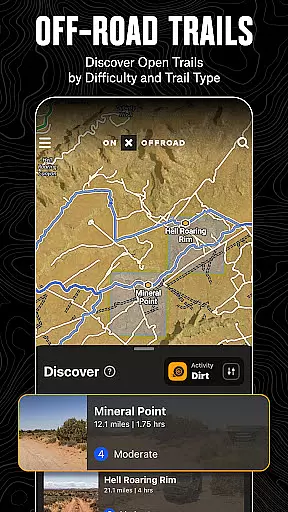
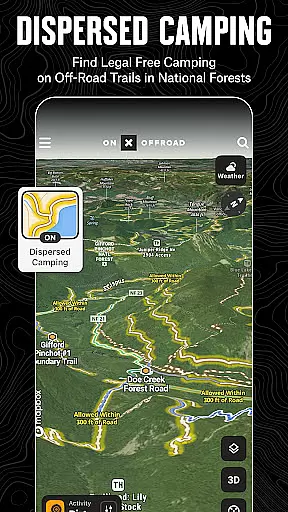
onX Offroad is a premier off-road navigation app designed for outdoor enthusiasts who love to explore trails and remote areas. The app offers advanced GPS mapping, 3D trail maps, and compass navigation, making it easy to discover nearby trails or plan new adventures. Whether you're into 4x4, SxS, dirt bikes, or snowmobiling, onX Offroad provides tailored trail information and helps identify legal, free camping spots in National Forests using verified USFS data.
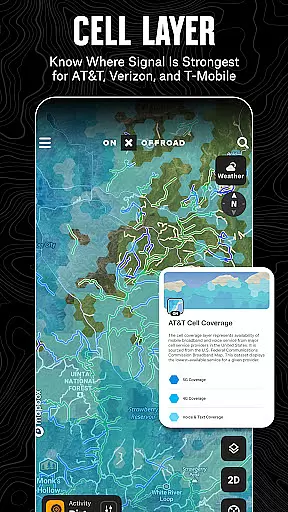
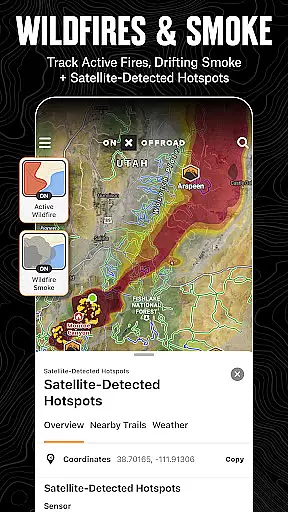
Beyond navigation, the app includes essential safety features such as wildfire activity tracking, smoke forecast data from NOAA, and cell coverage layers for major providers like AT&T, Verizon, and T-Mobile. With offline map capabilities, turn-by-turn directions, and Android Auto integration, users can confidently venture off the grid while staying informed and connected. From finding trailheads to marking waypoints, onX Offroad equips adventurers with tools to safely navigate and enjoy the great outdoors.
onX Offroad stands out with its comprehensive set of features tailored for off-road exploration. The app provides detailed OHV trails and map layers that allow users to filter trails based on vehicle type, including 4x4, SxS, ATVs, and snowmobiles. Users can toggle various map layers to access real-time weather updates, land boundaries, and cell service availability, ensuring they are well-prepared for any adventure.
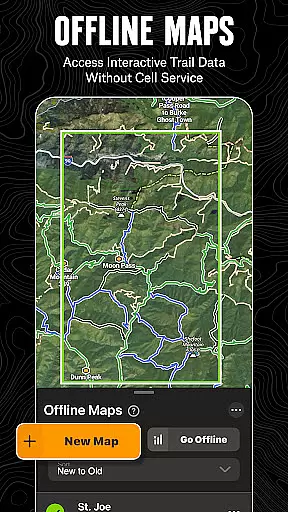
Offline navigation and route building capabilities make this app indispensable for remote journeys. Users can save offline maps without losing interactive trail data, receive voice-guided turn-by-turn directions, and even sync with Android Auto for seamless navigation. Additionally, the trip tracker and recreation points feature lets users mark important locations like campsites or fuel stations, track their journey metrics, and share trips with friends. These robust features ensure that adventurers have all the tools needed to explore confidently and return safely.
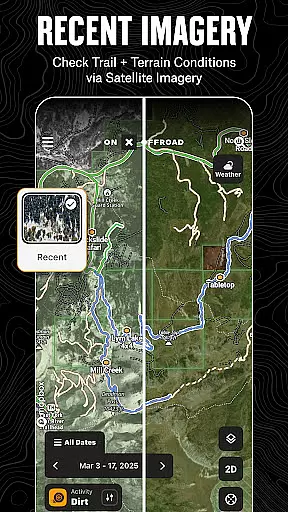
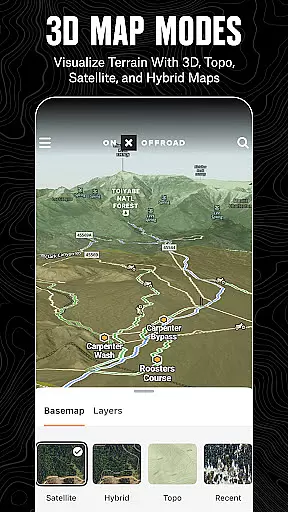
Map accuracy is essential for reliable navigation, especially in off-road environments where precision can make a significant difference. onX Offroad excels in this area by providing users with detailed 3D trail maps, topographic maps, and satellite imagery. These mapping features ensure that adventurers can trust the app to deliver precise location data, whether they are traversing remote wilderness areas or planning their next overland expedition.
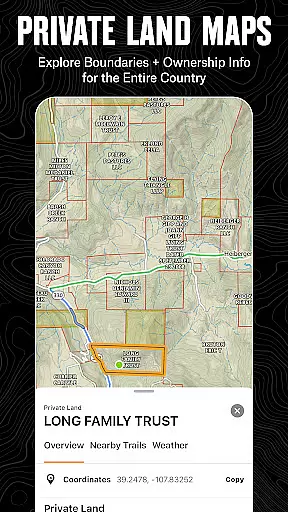
The app's commitment to accuracy extends to its inclusion of verified USFS data, which helps identify legal, free off-grid camping areas within National Forests. This level of detail not only enhances user confidence but also supports responsible outdoor recreation by helping users adhere to land-use regulations. Furthermore, the availability of nationwide property lines and public land ownership information ensures that users can navigate with awareness of boundaries, reducing the risk of accidental trespassing.
onX Offroad's dedication to up-to-date and comprehensive map data means that users can explore new terrains with peace of mind. The integration of real-time layers such as wildfire activity, smoke forecasts, and cell coverage further enriches the mapping experience. By prioritizing map accuracy, onX Offroad empowers users to venture confidently into the great outdoors, knowing they have a reliable tool at their disposal.
Effective route planning is crucial for successful off-road adventures, and onX Offroad offers an array of features designed to streamline this process. With the ability to filter trails based on vehicle accessibilityu2014such as 4x4, SxS, dirt bikes, and moreu2014the app caters to diverse off-roading preferences. Users can view trail conditions, difficulty ratings, and open/close dates, allowing them to select routes that match their skill level and vehicle capabilities.
The Route Builder feature stands out by enabling users to create custom routes that automatically snap to existing roads and trails. This functionality simplifies the planning phase, ensuring that users can focus on enjoying their journey rather than worrying about navigation mishaps. Additionally, the app provides turn-by-turn GPS directions with voice commands, which can be synced with Android Auto for seamless guidance from the tarmac to the trails.
For those venturing into areas without reliable cell service, onX Offroad allows users to save Offline Maps without losing interactive land and trail data. This capability ensures uninterrupted access to critical navigation information, empowering explorers to roam freely in parts unknown. By combining advanced route planning tools with offline functionality, onX Offroad equips users with the resources needed to embark on memorable adventures while staying safe and informed.
Comprehensive GPS mapping
Wide range of trail filters
Offline map functionality
Real-time wildfire tracking
User-friendly interface
Premium features require subscription
Limited free trial duration
Some regions lack detailed data
Occasional syncing issues
High data usage for offline maps

Compass is an accurate compass and a great tool for any outdoor activities
 4.5
4.5
Find shortest way and save energy . Distance and area calculator.
4.70
Phone Tracker and GPS Location Sharing
4.20
Navigate via GPS Maps of GPS Voice Navigation, driving directions to find routes
3.60
Find routes fast with GPS Maps, GPS Navigation & driving directions.
4.10
GPS navigation offers route finder, compass, translator, currency converter, etc
4.30
Get there with the Waymo Driver — The World’s Most Experienced Driver™
4.90
Get matched with a nearby driver — you’ll be on your way in minutes.
4.30
Rideshare, taxi cabs, and more for your airport travels and everyday trips.
4.50
This app is military GPS coordinate systems helper. (MGRS, UTM & DMS Maps)
4.80
Park in Chicago, NYC, Boston, SF, Houston & more!
4.70
Use GPS maps or search by property owner, address or parcel to view parcel data
4.30
Lets explore the world's famous places by using Live Cams, GPS & Satellite View.
4.20
Explore Live Earth Map with 3D World Map & locate cites, mountains real time.
3.80
Discover over 800 points of interest along the canal.
3.70
Gas Station & Fuel Rewards Points
3.70
Explore Earth with live GPS, satellite view & street navigation
3.60
Explore the world with Live Satellite View, 3D Maps, GPS Navigation & Earth Map.
2.90
All of NHSA's trail information at your fingertips for the 2025-2026 season
4.4


User Reviews