
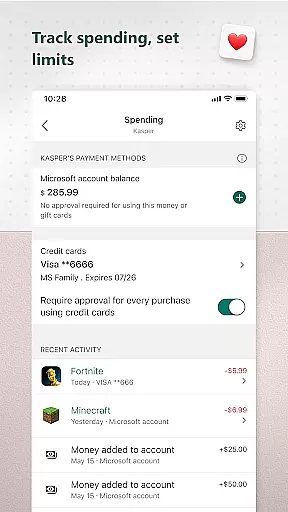
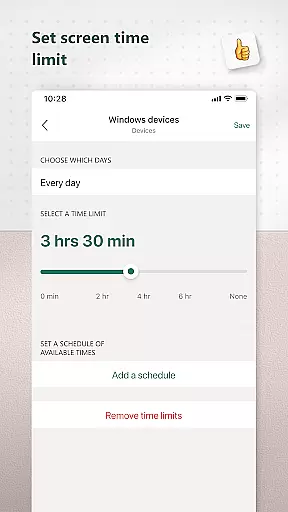
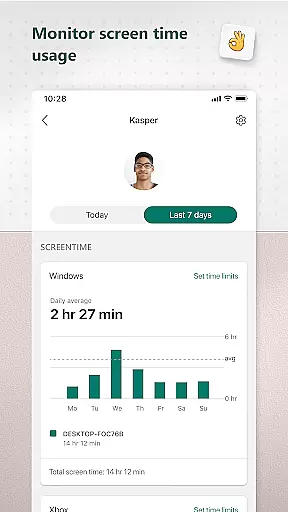
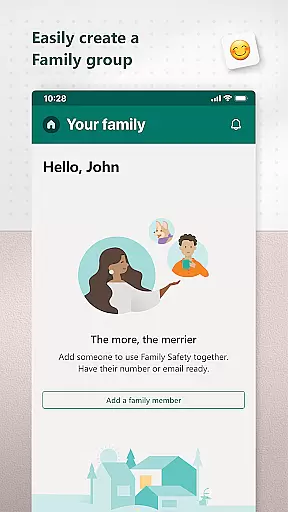
Microsoft Family Safety is a comprehensive parenting app designed to help families create healthy digital habits while ensuring online safety. The app offers parental controls that allow parents to filter inappropriate content, set screen time limits across devices, and monitor activity reports for their children's digital usage on platforms like Xbox, Windows, and Android.
Beyond basic monitoring, the app fosters open communication between parents and kids by providing weekly email summaries of online activity. This helps parents guide their children in developing balanced screen time habits and making informed decisions about their digital lives. With its dual focus on safety and independence, Microsoft Family Safety ensures kids can explore the digital world securely while adhering to age-appropriate restrictions.
Microsoft Family Safety stands out with its robust feature set tailored for modern families. One of its key highlights is the activity reporting system, which provides detailed logs of screen time and app usage. Parents receive weekly email summaries, enabling them to stay informed about their children's digital habits without constant monitoring.
The app also excels in screen time management, allowing parents to set specific time limits for apps, games, and devices. Whether it’s restricting gaming hours or managing overall device usage, the app ensures a balanced approach to digital consumption. Additionally, content filters enhance safety by blocking inappropriate apps and websites, while Microsoft Edge's kid-friendly browsing mode further protects younger users from harmful content.
Microsoft Family Safety provides a reliable parenting solution that is designed and validated by experts in child safety and digital wellness. The app's features are developed based on extensive research into online safety, ensuring that parents can trust the guidance and controls provided.
The app offers parental controls that filter inappropriate apps and games, allowing children to explore the digital world safely. These controls are regularly updated to adapt to new online trends and potential risks, maintaining their effectiveness over time.
Parents receive weekly email summaries of their children's digital activity, which helps them stay informed about their kids' online behavior. This reporting feature not only promotes transparency but also encourages open conversations between parents and children regarding responsible internet use.
By adhering to strict privacy standards, Microsoft ensures that all collected data is used solely for enhancing family safety, reinforcing the credibility of its parenting content.
Microsoft Family Safety excels in providing accurate growth tracking tools that help parents monitor their children's digital habits effectively. Through detailed activity logs, parents can observe screen time patterns across various devices such as Xbox, Windows, and Android.
The app allows setting specific time limits on apps and games, giving parents precise control over their children's digital engagement. Notifications are sent when a child requests additional screen time, enabling real-time adjustments and fostering responsible usage habits.
With location data collection requiring explicit consent from children, the app ensures that growth metrics are gathered ethically and transparently. This approach respects user privacy while delivering insightful analytics to parents.
These features collectively contribute to creating an environment where children can develop healthy digital behaviors under thoughtful parental supervision.
Comprehensive parental controls
Weekly activity reports
Cross-device screen time limits
Kid-friendly web filters
Encourages family communication
Limited to Microsoft ecosystem
Requires child's consent
No iOS screen time limits
Premium features may cost extra
Dependent on third-party permissions

Free symptom & med tracker with expert-reviewed tips.
 4.30
4.30
Daily Routine & Timer for kids, ADHD, & Autism
4.80
Track your pregnancy & your baby's growth in 3D. Get support from our community
4.60
Family GPS locator app — child location tracker. GPS kids tracker, family safety
4.70
Little loved one's monitoring, Sleep tracking and Parenting content.
3.80
Track pregnancy health and wellness with pregnant tracker from healthcare advice
4.2
Findnumber: Real-time location tracker for ultimate family security
4.20
Speech Therapy Exercises For All!
4.40
The Most Trusted Co-Parenting App.
4.60
Track baby’s development & growth week by week with BabyCenter’s pregnancy app!
4.90
Introduce real food to baby with First Foods® Database, baby led weaning BLW
4.80
All-In-One Pregnancy Tracker, Your Baby's Milestones, Growth Stages & Parenting
4.70
Join over 1MM parents & professionals who've used OFW to navigate co-parenting
4.40
Keep track of your stored breastmilk
4.40
Family parental control app: limit screen time, block apps, GPS tracker.
4.20
Pregnancy and baby formula tips for moms, plus Enfamil coupons & cash back
4.10
Screen Time, App and Web Block & Monitoring, Location Tracker
3.60
SemLog aims to raise awareness among families and their children
3.40
AI Motion Video Maker & Ideas
4.1


User Reviews