
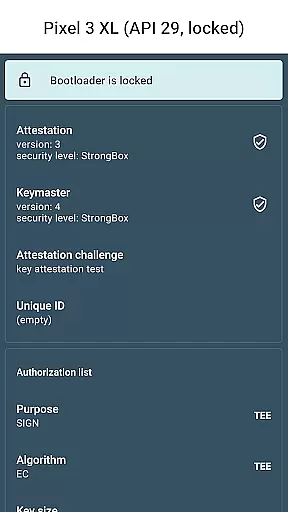
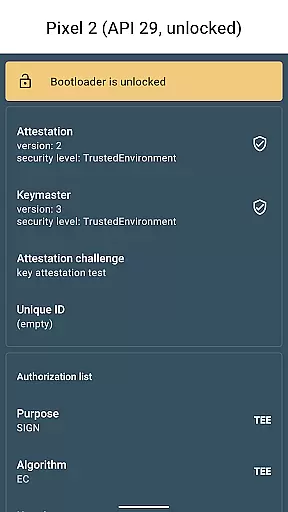
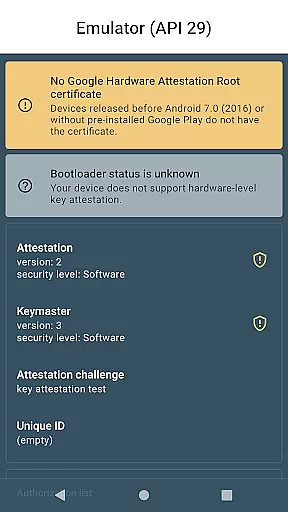
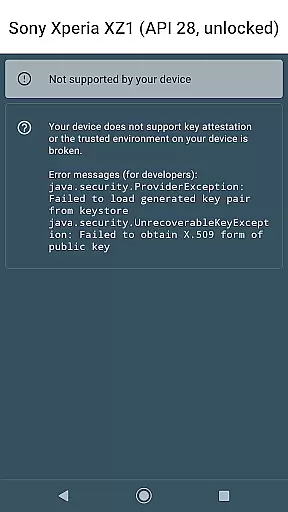
Key Attestation Demo is a specialized application designed for developers and power users who require advanced security features. This app allows users to verify the authenticity of cryptographic keys on Android devices, ensuring secure transactions and communications.
The core functionality revolves around implementing and demonstrating the key attestation process as provided by Android's security framework. It serves as both an educational tool and a practical utility for those working with secure applications. By using this app, developers can ensure their applications maintain the highest standards of key security.
This app is particularly useful in scenarios where device integrity and key authenticity are critical, such as financial services or secure enterprise communications. Its value lies in providing transparency and trust in the cryptographic processes that underpin modern mobile security.
One of the standout features of Key Attestation Demo is its ability to provide detailed attestation certificates for cryptographic keys. These certificates include information about the key's origin, properties, and the device's Trusted Execution Environment (TEE), offering a comprehensive overview of the key's security context.
In addition to certificate generation, the app includes access to essential documentation and source code. This allows developers to understand the underlying mechanisms and implement similar security measures in their projects. The inclusion of direct links to Android's official documentation further enhances its educational value.
Another notable feature is the app's open-source nature, with the source code available on GitHub. This transparency not only builds trust with the developer community but also encourages collaboration and improvement. Developers can review, modify, and contribute to the codebase, fostering innovation in mobile security practices.
For a library or demo app like Key Attestation, functionality completeness refers to how thoroughly it implements the features needed for its purpose. This app allows developers and power users to explore Android's key attestation capabilities, which are crucial for verifying the authenticity of cryptographic keys on Android devices.
The app covers essential aspects such as generating key pairs, requesting attestations, and displaying detailed information about the keys and their properties. It provides an interface to interact with Android's keystore system, enabling users to understand how key attestation works in practice.
By offering access to comprehensive documentation and source code, the app ensures that users can delve into the specifics of key attestation. This makes it an invaluable tool for those looking to implement secure solutions on Android platforms.
Users benefit from having a complete set of tools to test and verify key attestation processes, ensuring their applications maintain high-security standards. The app's thoroughness in covering these functionalities helps developers build more secure and reliable apps.
Usability and operational smoothness are critical for any development tool, including libraries and demo apps. Key Attestation Demo is designed with a straightforward interface that simplifies interaction with complex security features, making it accessible even to those new to key attestation.
The app provides clear instructions and links to official documentation, helping users quickly grasp how to perform key attestations. Its integration with Androidu2019s developer resources ensures that users have all the necessary information at their fingertips.
Operational smoothness is evident in the seamless generation of key pairs and retrieval of attestation certificates. The app handles these operations efficiently, minimizing delays and ensuring a responsive user experience.
Additionally, by offering open-source code, the app invites community contributions and improvements, enhancing its usability over time. Developers can customize and extend the app to suit their specific needs, further boosting its value as a development tool.
Advanced security features
Comprehensive documentation
Open-source transparency
Trusted execution verification
Developer-focused tools
Complex for casual users
Limited mainstream appeal
Requires technical knowledge
No user-friendly interface
Niche market application

Tune your game graphics with our GFX optimizer for optimal gaming experience
 4.50
4.50
Block and secure the microphone and protect from secret listening and recording.
4.50
Popular mods fnaf mods for melon playground
4.50
Zlink Carplay Android a mirror link app with a Carplay interface style
4.5
Mirror link car connector to share your screen with car dashboard
3.80
Endoscope camera an app to connect with endoscope cam or any device
3.30
The best PS2 games from your childhood come to life in their mobile version!
4.00
Now Available on Android ™
3.40
Expo is a free & open source platform to build apps using JavaScript and React.
4.70
SmartCast mirrors Android phone to TV screen With Cast Screen, Chromecast.
4.80
Game booster GFX may reduce interruptions and improve gaming experience.
4.50
Do you want to drive easy ? do you wanna full mirror link Mobile with your car
4.10
Demo version of the mcpro24fps manual video camera. Try and buy a full version!
4.00
A Pydroid Quick Install repository provider.
4.00
Connect and find your Smart Tag 2 devices through our app.
3.60
CloudEye 365 is a easy-handling APP
3.60
Record with Double Camera Video Recording using Dual Camera Front and Back Video
3.00
If you are looking for melon playground mod that fun you deffinitely try our app
2.70
Turn your phone into a wireless Xbox controller – play, stream & control anytime
4.1


User Reviews