
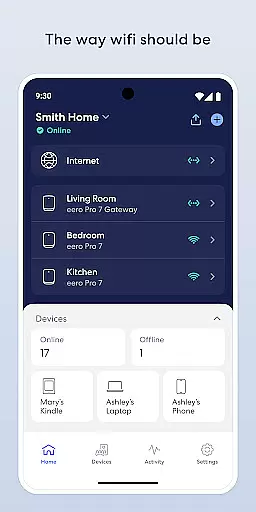
eero WiFi System is a comprehensive home networking solution that blankets your entire home in fast, reliable WiFi coverage. The eero app allows users to easily set up and manage their eero devices, sold separately, ensuring optimal performance and security. With automatic updates, the system stays current with new features, performance improvements, and enhanced security protocols.
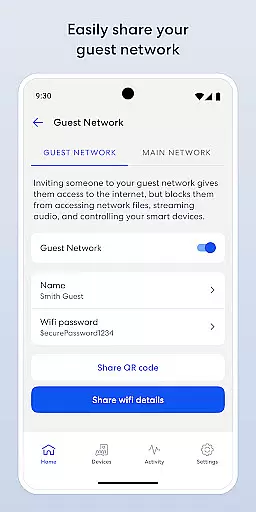
Users can control their network from anywhere, share access securely with guests, and manage screen time through scheduling or pausing internet access. Advanced features like device blocking and optional eero Plus subscription provide additional layers of security and parental controls. This makes eero an ideal choice for homes where seamless connectivity is crucial for streaming, working, and playing across all corners of the house.
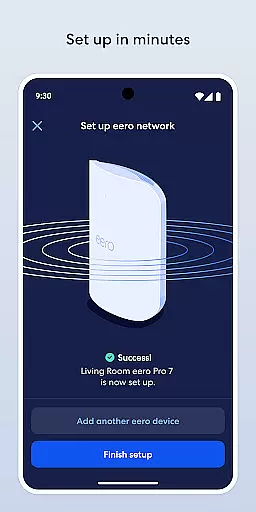
The eero app offers a variety of advanced features designed to simplify network management. Setup is quick and easy, often completed within minutes, allowing users to get online swiftly. Automatic updates ensure the system remains up-to-date with the latest features, performance enhancements, and security standards without any manual intervention.
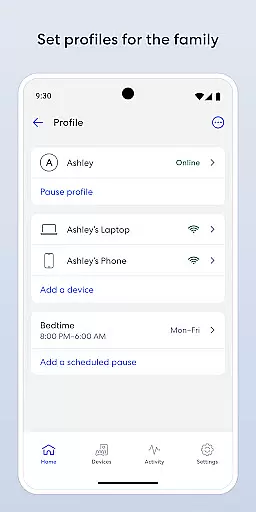
One standout feature is the ability to manage your network remotely. Whether you're at home or away, you can view network status, add or remove devices, and adjust settings. Additionally, the app provides tools for managing screen time by scheduling or pausing internet access, which is particularly useful for parents looking to control device usage among children.
For those seeking extra protection, eero Plus offers advanced security measures, including a password manager, antivirus software, and a VPN powered by Guardian. These features collectively ensure a robust, secure, and user-friendly networking experience tailored to modern smart homes.
The eero app goes beyond basic wifi management by offering a comprehensive suite of features that cater to various aspects of modern digital lifestyles. With functionalities ranging from network setup and management to advanced security options, the app ensures users can maintain a connected household effortlessly.
One of the standout lifestyle features is the ability to manage screen time through scheduling or pausing internet access. This allows families to create healthier digital habits by controlling when and how their network is used. Additionally, the option to easily share your network with guests adds convenience for social gatherings or temporary visitors.
The app also offers eero Plus, a subscription service that enhances the lifestyle experience with advanced security measures, parental controls, and priority customer support. These features ensure that users not only enjoy seamless connectivity but also have peace of mind regarding their online safety.
eero's commitment to content authenticity is evident in its regular software updates that bring new features, performance improvements, and enhanced security standards. These updates are developed based on expert insights and user feedback, ensuring the app stays relevant and effective in managing modern home networks.
The app provides verified information about network status and security, giving users reliable data to make informed decisions. Features like device blocking and guest network sharing are implemented with industry-standard protocols, reinforcing the credibility of the solutions provided.
Furthermore, eero's collaboration with Guardian for VPN services demonstrates their reliance on expert-developed technologies to enhance user privacy and security. By integrating these professional-grade solutions, eero establishes itself as a trustworthy partner in maintaining a secure and efficient home network environment.
Fast and reliable WiFi coverage
Easy setup and management
Automatic updates
Remote network management
Advanced security options
eero devices sold separately
Subscription required for eero Plus
Limited customization options
Occasional connectivity issues
Higher cost compared to basic routers

Chat, meet genuine singles in your area. Real connections start with being real.
 4.30
4.30
Countdown to Christmas 2025 with festive games & activities in a virtual village
4.80
Get your life organized with My Agenda!
4.30
Unique Dual Colors with 6 Custom Complications for Wear OS watches!
3.40
Do you want to communicate with spirits?
3.80
My Diary - Daily Journal with lock: Diary journal app and secret diary with lock
4.80
An Eerie Musical Trigger Toy for Spirits to Play with!
3.50
A unique and customizable watch face which rotates its layout every minute.
4.80
The Wyze app is your gateway to a smarter life and a safer home.
4.40
Good magnifier app to see tiny things bigger and more clearly!
4.80
Kasa Smart is your portal to your TP-LINK Smart Home.
4.70
PARAVOX 4 is a professional ITC paranormal research application.
4.50
Cute Adorable Animals now on your wrist with our Wear OS watch face!
4.40
Share opinions, get paid cash
4.30
Earn points with every purchase with Moe Rewards.
4.20
Digital watch face design. Modern looking, hi-res & battery friendly.
4.00
Going above and beyond known spirit communication
3.60
The Miracle Box includes methods used by Steve Huff of Huff Paranormal.
3.20
Big bold weather watch face with dynamic backgrounds and 3 complications
4.3


User Reviews