
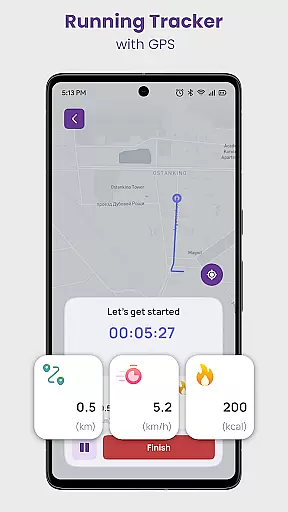
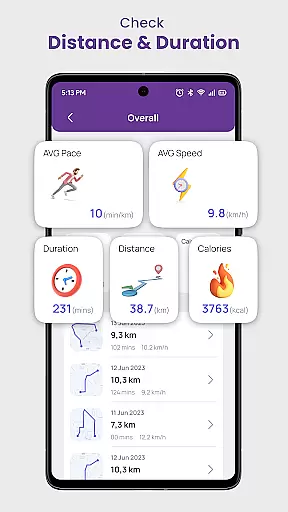
Daily Running Tracker with GPS is a comprehensive fitness application designed to enhance your running experience. This app serves as a personal running companion, utilizing GPS technology to track your route, distance, and pace in real-time. Whether you are a beginner or an experienced runner, the app provides detailed statistics on your performance, empowering you to set and achieve personal goals.
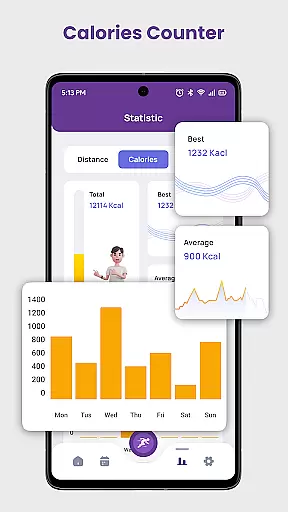
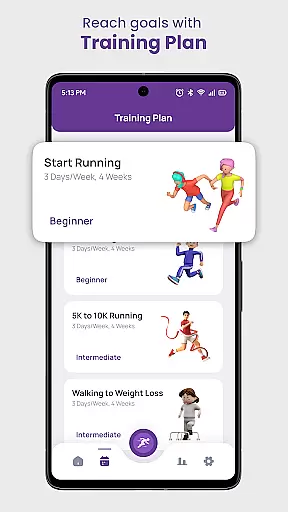
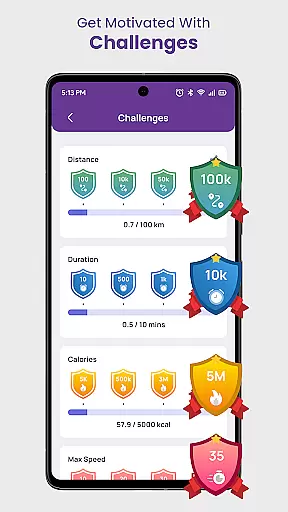
One of the standout features of this app is its ability to function as a calories counter, giving you insights into the calories burned during each session. Additionally, it offers training plans tailored to various objectives such as 5K or 10K preparation, weight loss, and more. With built-in challenges and a community aspect, users can participate in virtual races and earn achievements, keeping motivation high.
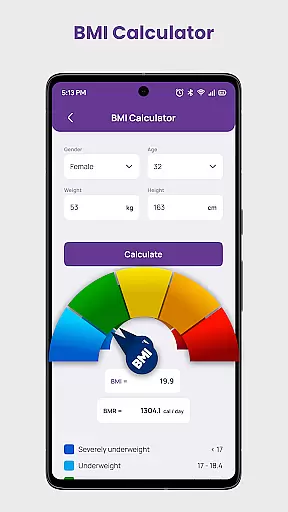
The app also includes a Body Mass Index (BMI) calculator, allowing users to monitor their overall health progress. By recording key metrics like longest distance, duration, and max speed, Daily Running Tracker with GPS ensures that runners have all the tools they need to succeed. Its offline functionality makes it accessible anytime, anywhere, supporting a healthier, more active lifestyle.
Daily Running Tracker with GPS stands out due to its rich feature set tailored for runners. The app's GPS-powered tracking system accurately monitors your route, distance, and pace, providing real-time feedback to help you optimize your runs. This feature is complemented by detailed statistics that allow users to analyze their performance over time, fostering continuous improvement.
In addition to tracking, the app functions as a robust calories counter, calculating the calories burned during each jogging session. This helps users make informed decisions about their fitness routines. The inclusion of structured training plans for various goals—be it a 5K, 10K, or weight loss—ensures that users receive expert guidance tailored to their specific needs.
Community engagement is another highlight, with challenges and virtual races that keep users motivated. The built-in BMI calculator adds a layer of health monitoring, while the ability to record significant running indexes supports long-term progress tracking. These features collectively create a holistic tool that not only tracks but enhances the overall running experience.
Personalized planning in a fitness app refers to the ability to create tailored workout schedules that adapt to individual needs and progress. This feature is crucial for maintaining user engagement and ensuring optimal results.
Daily Running Tracker with GPS excels in delivering personalized experiences through its adaptive goal-setting system. The app allows users to define specific objectives, such as running a certain distance or achieving a target pace. It then generates customized training plans based on these goals, whether you're preparing for a 5K or aiming for weight loss.
The true value lies in the app's intelligent tracking capabilities. By monitoring your performance metrics like distance covered, calories burned, and personal records, the app continuously adjusts your plan. This ensures that your workouts remain challenging yet achievable, helping you progress steadily while minimizing the risk of injury.
Users benefit from having a virtual running coach that evolves with their fitness journey. The combination of structured training plans, real-time feedback, and adaptive goal management creates a powerful tool for achieving lasting fitness improvements.
Progress visualization is an essential feature in fitness apps that helps users track their achievements and stay motivated. By presenting workout data in an easily digestible format, it enables runners to understand their improvement over time.
The Daily Running Tracker with GPS app offers comprehensive progress visualization through detailed statistics and record-keeping features. Users can view their longest distance, fastest speed, and maximum calorie burn, creating clear milestones in their running journey.
What sets this app apart is its multi-dimensional approach to tracking achievements. Beyond basic statistics, it maintains records of various performance indicators including duration and pace. These metrics are presented through intuitive graphs and charts, making it simple to identify trends and areas for improvement.
This visualization system provides powerful motivation by showcasing tangible results. When users can clearly see their progress, from their first run to their latest personal best, they're more likely to maintain their commitment to regular exercise and push beyond their limits.
User-friendly interface
Accurate GPS tracking
Comprehensive training plans
Active community challenges
Offline functionality
Limited social features
No live coaching
Premium subscription required
Occasional GPS inaccuracies
High battery consumption

The Wear OS BeechBand app is designed to alleviate anxiety and other conditions
 4.4
4.4
Weight loss app: home workout for women to lose weight & burn calories.
4.80
Create powerful subliminal audio with custom affirmations and background music.
4.00
Insanity blocks of intense physical activity, short breaks of 30 seconds.
4.0
For Absolute Novices to Strength Training. Simple. Effective.
4.40
Relax. Sleep Better. Feel Better.
4.50
You deserve easy access to important insurance information. Download for FREE.
4.70
Your personal BP tracking companion, focus on helping you achieve wellness goal.
4.10
Pedometer that gives you sweatcoins for steps. It pays to walk!
4.10
Meditation app, head space app provides calm music to help you meditate & sleep
5.00
Protect your healthy sleep
4.80
Point, scan, and unlock truth in every bite.
4.50
Blood Pressure Log, HRV & Heartbeat Tracker. Pulse Checker.
4.40
Your portable blood pressure tracker. Record, monitor, and analyze BP anytime.
4.30
Pack of 66 calming lullabies for smooth fall asleep and relaxation
4.10
Get alert about getting out of desired heart rate zone.
4.10
Make sense of your health data.
3.80
Dexcom G7 Continuous Glucose Monitoring
3.70
Use your watch as a bike computer, heart rate monitor and cycling power meter
2.50


User Reviews