
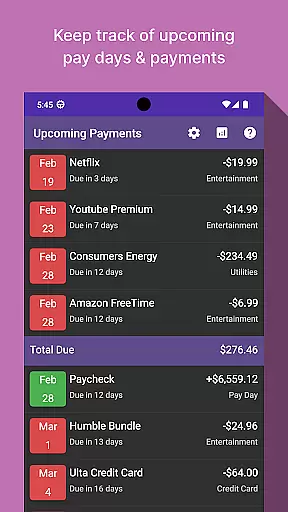
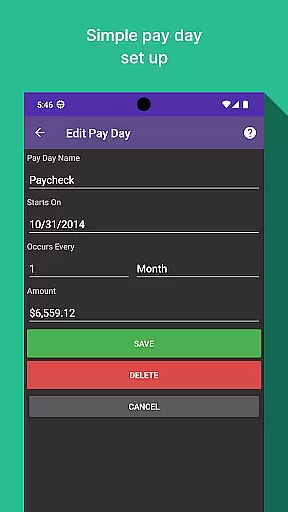
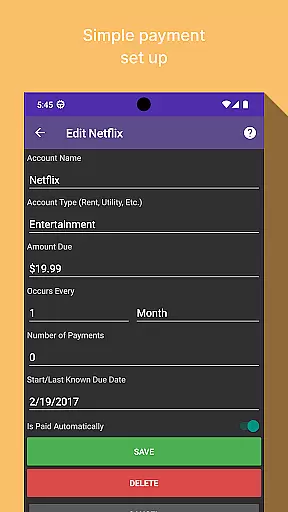
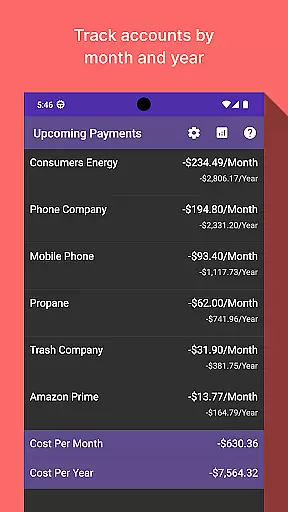
Bill Manager is a comprehensive financial management tool designed to help users stay on top of their upcoming bills and payments. The app provides detailed information about pending bills, including payment amounts and due dates, while also tracking your next payday. This ensures you never miss a payment deadline again.
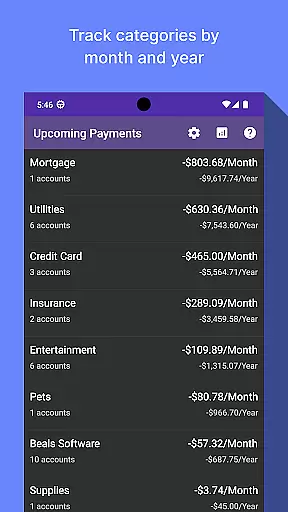
In addition to bill tracking, Bill Manager offers an analytics view that allows users to analyze their spending habits by category and account. This feature provides monthly and yearly breakdowns, helping users better understand their financial patterns and make informed decisions. Whether you're managing personal expenses or monitoring shared accounts, this app delivers the insights needed for effective financial planning.
One of the standout features of Bill Manager is its ability to display all pending bills from the current date up to your next payday. This functionality not only lists the bills but also specifies the exact payment amounts and due dates, ensuring complete transparency in your financial obligations.
The app's analytics view is another key feature, offering users the ability to review costs by category and account on both a monthly and yearly basis. This helps identify spending trends and areas where adjustments can be made. With its intuitive interface and robust tracking capabilities, Bill Manager empowers users to take control of their finances with ease.
Additionally, the app supports customizable notifications, ensuring you are always reminded of upcoming payments. Its user-friendly design makes it accessible for individuals of all tech backgrounds, while the secure login process guarantees that your financial data remains protected at all times.
Account and fund security is a critical aspect of any financial application, ensuring that users' sensitive information remains protected. Bill Manager employs advanced encryption protocols to safeguard your data against unauthorized access. This means that all your bill details, payment schedules, and personal information are encrypted both in transit and at rest.
In addition to encryption, the app implements multi-factor authentication to further secure your account. By requiring more than just a password to access your account, it significantly reduces the risk of unauthorized access. This added layer of security ensures that only you can make changes to your billing information or view your financial details.
The benefits of these security measures are manifold. Users can enjoy peace of mind knowing that their upcoming bills and pay day information are securely stored. Moreover, the robust security framework helps maintain the integrity of the analytics view, which displays costs by category and account, without compromising on safety.
A seamless transaction experience is vital for managing bills efficiently, and Bill Manager excels in providing an intuitive interface for tracking payments. The app offers real-time notifications for upcoming bills, ensuring that you never miss a payment deadline. These timely alerts help you stay on top of your financial obligations and avoid late fees.
Beyond notifications, Bill Manager provides a detailed overview of each transaction, including the amount due, payment date, and associated account. This level of detail allows users to manage their finances with precision, making informed decisions about their spending and savings. Furthermore, the app's analytics view enhances this experience by offering insights into monthly and yearly expenditures across different categories.
Ultimately, the transaction experience in Bill Manager empowers users to take control of their financial health. With clear, accessible information at their fingertips, users can plan their expenses around their pay days, leading to better financial management and increased confidence in their monetary decisions.
User-friendly interface
Comprehensive bill tracking
Detailed analytics reports
Customizable notifications
Secure data protection
Limited free version
No multi-currency support
Occasional syncing issues
Ads in basic plan
Requires constant updates

The all-in-one app to save, earn, travel, and put more money in your pocket
 4.50
4.50
Play for fun, earn for real. Collect rent by owning virtual land & get cashback
4.60
Easily invest, save, and plan—all in one app.
4.60
Get 250$ Cash Advance to solve emergencies instantly in loan app called LendMe
4.70
Get up to 500, get paid early, earn interest and find work with no hidden fees.
4.40
Read and extract public data on NFC Contactless banking card (VISA, MasterCard
4.30
Powerful Money Manager, Expense & Savings Tracker, Budget Planner - Pro Version
4.70
Venmo is the fun and easy way to pay and get paid.
4.10
Send money and bitcoin easily. Invest, bank and do more with your money
4.70
Manage your Discover account conveniently from anywhere.
4.80
No credit checked needed.
4.80
All expenses at a glance.
4.80
Loan Calculator, Mortgage Calculator, Compound Interest Calculator
4.70
Debt pay off. Build credit history. AI budget tool. Loan offers.
4.60
Banking, Budgeting & Investing
4.60
Our Chase Mobile App makes it easy for you to bank on the go 24/7.
4.60
Mine Bitcoin in the cloud! Earn BTC daily with high-speed mining power.
4.30
Invest, bank & save in one app. Trade stocks, earn high APY & budget smarter.
4.00
Bank better with our new app
3.80


User Reviews