
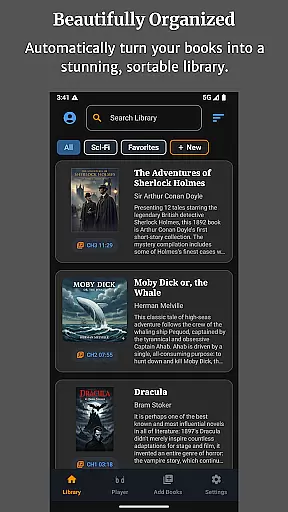
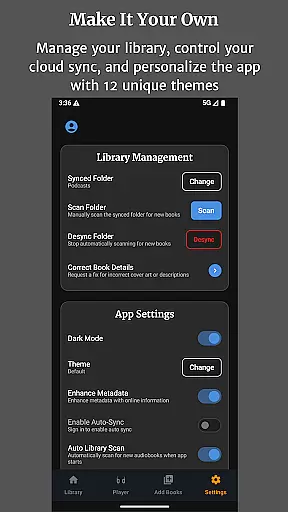
Audiobook Buddy is a comprehensive audiobook management app that transforms scattered audio files into an organized, visually appealing library. The app supports syncing from local folders and popular cloud services like Google Drive, OneDrive, and Dropbox, creating a unified library with smart organization features.
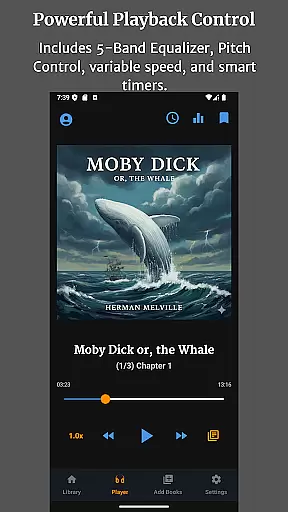
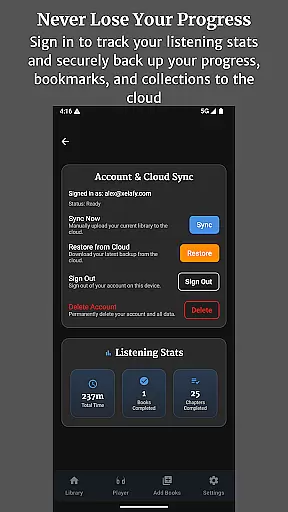
With support for various audio formats and metadata, Audiobook Buddy offers flexible playback options including a 5-band equalizer, pitch control, and per-book speed settings. Users can enjoy background playback, lock-screen controls, and customizable themes while tracking their listening progress across devices through cloud-synced bookmarks.
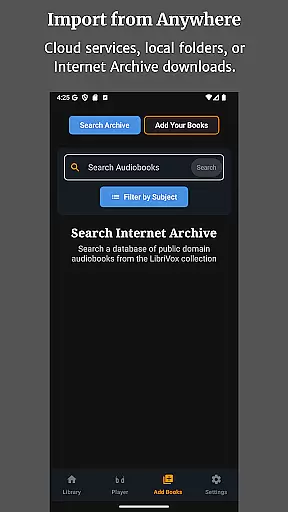
Audiobook Buddy stands out with its advanced library management capabilities. It allows users to create Collections for grouping related audiobooks, similar to playlists, and provides access to public domain books via LibriVox. The app also supports importing personal files and ZIP archives.
Playback features include smooth navigation with adjustable speed, sleep timer functionality, and full lock-screen controls. Audiobook Buddy ensures accessibility with translations in multiple languages and enhances user experience with 11 customizable themes and optional home screen widgets.
The app's full file support covers major audio formats such as MP3, M4A, FLAC, and more, along with metadata formats like CUE and NFO. Cover art compatibility includes embedded artwork and common image formats, ensuring a rich visual experience.
Audiobook Buddy offers an extensive library of public domain audiobooks sourced from LibriVox, providing users with a vast selection of titles to choose from. Beyond the public domain offerings, the app allows for importing personal files and ZIP archives, enabling users to build their own customized libraries.
With support for a wide range of audio formats such as MP3, M4A, M4B, AAC, OGG, FLAC, WAV, and WMA, Audiobook Buddy ensures that users can access their content in the format they prefer. The app reads metadata formats like CUE, NFO, TXT, and cover art including embedded art, JPEG, PNG, and WebP, enhancing the user's experience by presenting rich details about each book.
While DRM-protected audiobooks are not supported, Audiobook Buddy directs users to resources like Open Library and the Internet Archive where they can find non-DRM titles, ensuring that all content within the app is copyright compliant and legally accessible.
The app boasts full file support, accommodating various audio formats including MP3, M4A, M4B, AAC, OGG, FLAC, WAV, and WMA, making it versatile for different user preferences and needs. This comprehensive format compatibility ensures that users can enjoy their audiobooks without worrying about file type restrictions.
In addition to audio formats, Audiobook Buddy supports metadata formats such as CUE, NFO, and TXT, allowing for detailed organization and easy navigation through the library. Cover art support includes reading embedded art as well as JPEG, PNG, and WebP formats, enriching the visual presentation of the audiobook collection.
By focusing on non-DRM audiobooks, Audiobook Buddy maintains high standards of format compatibility while promoting legal and unrestricted listening experiences. Users are encouraged to explore DRM-free options available on platforms like Open Library and the Internet Archive or import their personal collections.
User-friendly interface
Extensive format support
Cloud sync functionality
Customizable themes
Advanced playback options
No DRM support
Limited language options
Requires manual import
Occasional sync issues
Premium feature costs

The Original Tropical Freshwater Aquarium Fish And Plant Care Guide
 4.80
4.80
Plan of Life that Saint Josemaría recommended
4.80
7 Languages, Google, Wiki, Vocabulary.com, Cambridge & Urban Dictionary!
4.50
Battle Royale Chapter 5 Season 2 HD Wallpapers Emotes Skins and BattlePass
3.00
Translate into 100+ languages with the world’s most accurate AI translator.
4.70
Unlock unlimited access to bestselling ebooks, novels, stories, and audiobooks
4.60
Enjoy daily devotionals, Bible verses, audio courses, and more.
4.80
Build family tree & discover DNA, family history heritage, origins and ancestors
4.60
Daily thoughts, meditations, and prayers for living a sober life in recovery.
4.90
What’s that bird? Just answer 5 questions, snap a photo, or record its song!
4.90
The Bible Audio Guide
4.80
Track your Star Wars book collection across Canon & Legends
4.80
A lightweight reader for comics and mangas files (.cbr, .cbz, .cbt, .pdf, ...)
4.80
Read the KJV Bible with Strong’s offline: reading plans, audio Bibles, and more.
4.70
"Do you like green eggs and ham?"
4.70
Scan. Price. Grade.
4.60
Bilingual dictionary with English translations of Modern Standard Arabic words.
4.30
Shop over 13 million new and used books at up to 80% off list price
4.20
A guide for the Court of Atonement spiritual healing process.
4.2


User Reviews