

Look Up - Pop Up Dictionary Pro is an innovative offline dictionary app designed for book lovers and those who appreciate instant word lookup. The app eliminates the need to search online every time you encounter a challenging word, making it perfect for avid readers and ex-iOS users missing the convenient lookup feature.
This powerful dictionary supports 7 languages including English, Italian, Spanish, German, Portuguese, and French. It comes with essential integrations like Moon Reader Dictionary Support and Anki Flashcard support, as well as useful plugins such as Urban Dictionary, Google Define, Vocabulary.com, Wikipedia, and Cambridge. Whether you're reading an eBook or studying a foreign language, Look Up ensures you have quick access to word definitions and contextual meanings.
The app's standout feature is its versatile search functionality that works in three ways: by copying a word (for Android versions below 9.0), using the lookup button after selecting a word (Android 6.0+), or sharing the selected word directly to the Lookup App. With its comprehensive offline Wordnet database of 220,000 words and phrases, fast predictive searching, and helpful features like word starring, notes addition, and dark mode, Look Up is an indispensable tool for enhancing your reading and learning experience.
Look Up - Pop Up Dictionary Pro offers an impressive array of features that make it stand out among dictionary apps. One of its key strengths is the robust offline functionality powered by the comprehensive Wordnet database containing 220,000 words and phrases. This ensures users can access definitions anytime without an internet connection.
The app provides multiple ways to search for words, catering to different user preferences and device capabilities. Users can copy a word for quick lookup (on Android versions below 9.0), use the dedicated lookup button after selecting a word (Android 6.0+), or share the selected word directly to the Lookup App. The integration with popular tools like Moon Reader and Anki Flashcards enhances its utility for both casual readers and serious language learners.
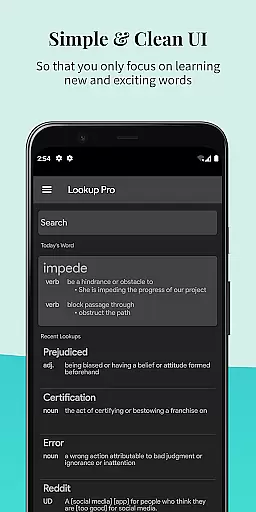
Additional notable features include the ability to star important words for easy reference, add personal notes to words for better retention, and enjoy comfortable night-time reading with dark mode. The app also offers pronunciation assistance by speaking the word aloud, syncs data to Google Drive (which can be disabled), and provides a Word of the Day feature both within the app and through notifications. These thoughtful additions make Look Up an exceptional tool for expanding vocabulary and improving language skills.
Look Up - Pop Up Dictionary Pro offers an extensive offline word database that enhances its e-book library size and authenticity. With over 0.22 million words and phrases in its Wordnet Database, users have access to a vast repository of language resources without needing an internet connection.
The dictionary supports multiple languages including English, Italian, Spanish, German, Portuguese, and French, ensuring comprehensive coverage and accurate translations. This multilingual support is crucial for users who engage with literature across different languages, providing them with reliable definitions and contextual usage.
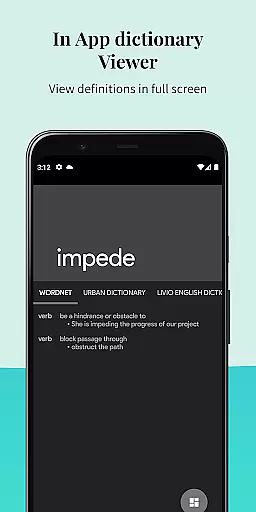
In addition to the core dictionary, Look Up integrates with authoritative sources like Urban Dictionary, Google Define, Vocabulary.com, Wikipedia, and Cambridge. These integrations ensure that users receive definitions that are not only extensive but also aligned with current language trends and scholarly references.
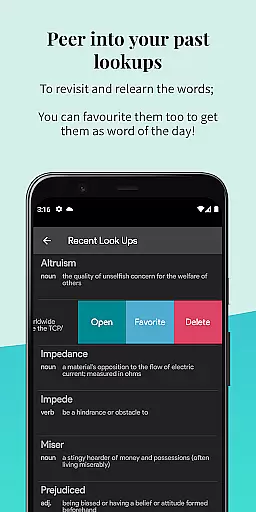
By allowing users to star words they wish to remember and add personal notes, the app creates a personalized learning experience. This feature helps reinforce memory retention and contextual understanding, making it an invaluable tool for bibliophiles and language learners alike.
One of the standout features of Look Up - Pop Up Dictionary Pro is its versatile format compatibility, which caters to various user needs and device specifications. The app supports three distinct methods for word lookup, ensuring seamless interaction regardless of the Android version a user operates.
For devices running Android versions below 9.0, users can simply copy a word to trigger the pop-up dictionary. Meanwhile, those on Android 6.0 and above can utilize the dedicated lookup button after selecting a word, streamlining the search process significantly.
Additionally, users have the option to share selected text directly to the Lookup App, broadening its accessibility across different apps and platforms. This flexibility ensures that no matter where or how a user encounters an unfamiliar term, they can quickly obtain a definition without disrupting their workflow.
Furthermore, Look Up's compatibility extends to popular e-reading platforms such as Moon Reader, enhancing the reading experience by providing instant definitions and translations. This integration demonstrates the app's commitment to supporting diverse digital reading habits while maintaining high standards of functionality and user convenience.
Offline functionality
Multi-language support
Versatile search options
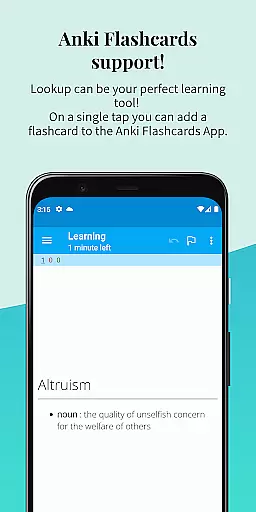
Anki Flashcard integration
User-friendly interface
Limited advanced grammar tools
No live translation feature
Premium version required
Occasional sync issues
Heavy storage usage

"BIG A, little a. What begins with A?"
 4.10
4.10
Mirror Bible - eye-opening paraphrase translation of the NT by Francois du Toit
4.30
Master AKC Rally signs with in-depth hints, diagrams, and expert guidance.
4.50
Read the romance stories on the go. Take my breath away, The Spoiled Girl
4.30
Liturgy of the Hours totally off-line
4.80
Research your family history to explore ancestors and search for your heritage
4.50
Read books PDF, EPUB, WORD, KINDLE, MOBI! Your ebook reader among reading apps.
4.80
Discover, track, and share your reading with friends & our community of readers
4.60
Calculate, Knowledge, Homework
4.40
A KJV Bible with Apocrypha and precept-based study concordance
5.00
Track your Star Wars book collection across Canon & Legends
4.80
Read and study the Bible and other content in over 1,000 languages.
4.80
Daily Prayer, personalized Bible Study, AI-guided Insights, and Spiritual Growth
4.80
Read the KJV Bible with Strong’s offline: reading plans, audio Bibles, and more.
4.70
"Five Dr. Seuss titles in one omBook!"
4.60
Crowd-sourced listing of businesses with anti-gun signs, and pro-2a alternatives
4.60
Find, discuss, and organize your world of books and shows.
4.60
Enjoy your favorite books
3.50
Fast loot guide for ARC Raiders. Simple tips, stats, maps, and item details.
4.0


User Reviews