
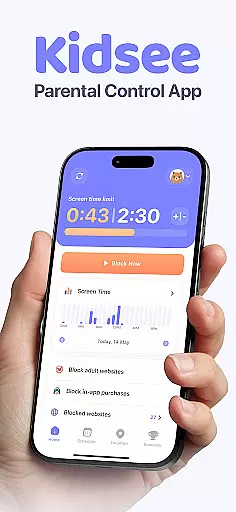
Kidsee Parental Control is a comprehensive family safety solution designed to help parents manage their children's screen time, app usage, and online safety. The app offers flexible controls for setting daily time limits, blocking specific apps, and creating custom schedules tailored to different days or activities.
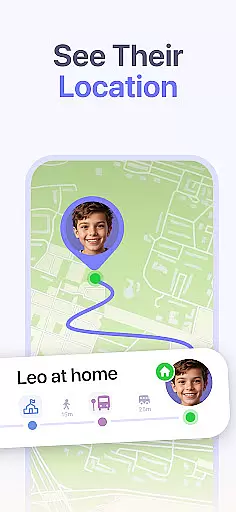
One of the standout features is its real-time GPS tracking capability, which allows parents to monitor their child's location and view location history. This ensures peace of mind when kids are out and about. Additionally, Kidsee provides tools to block inappropriate content, in-app purchases, and distracting apps, promoting healthier digital habits.
This app is particularly useful for families with multiple children, as it supports up to 10 child devices that can be managed from a single parent account. Whether you're looking to prevent phone addiction, improve focus, or simply keep your kids safe online, Kidsee delivers an all-in-one solution that empowers parents while supporting children's digital wellbeing.
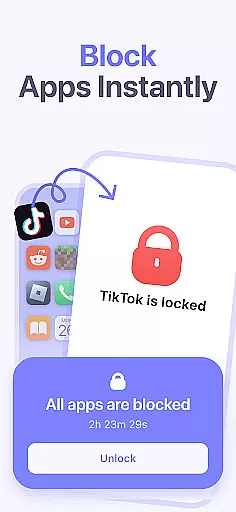
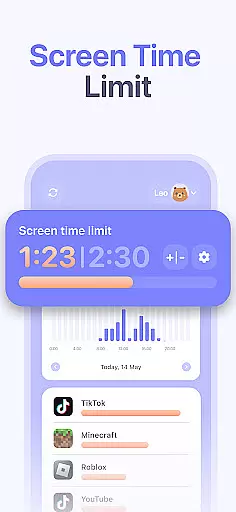
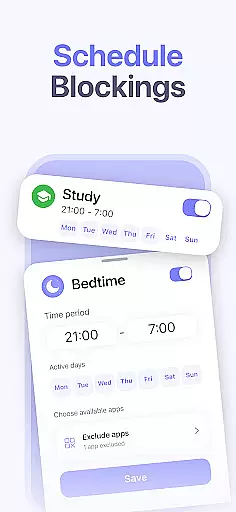
Kidsee Parental Control stands out with its robust set of features designed to give parents full control over their children's device usage. One key feature is the ability to remotely lock apps on the child's phone instantly. Parents can also set precise daily time limits not just for overall screen use but for individual apps, allowing them to block games or social media during school hours or bedtime.
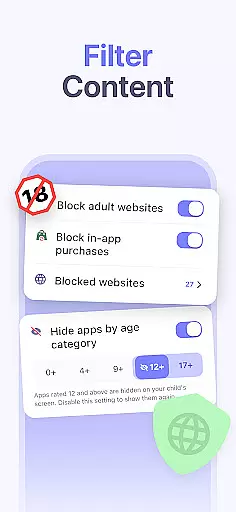
The app includes powerful monitoring tools such as real-time GPS tracking and location history, ensuring parents always know where their child is. It also displays the battery level of the child's device, preventing unexpected disconnections. For online safety, Kidsee automatically blocks adult content and allows manual entry of specific websites to block, providing an additional layer of protection against inappropriate material.
Another notable aspect is its support for both Android and iOS devices, making it versatile for families using different platforms. With the ability to manage multiple children from one account and exclude educational apps from restrictions, Kidsee proves itself as a thoughtful and comprehensive parental control tool.
When it comes to parenting apps, the credibility of the content and validation by experts is paramount. Kidsee Parental Control App ensures that all features are designed with the guidance of child psychologists and digital safety experts. This guarantees that the app not only helps in managing screen time but also promotes a healthy digital environment for children.
The app's ability to block 18+ and adult content is backed by robust filtering algorithms developed in consultation with internet safety organizations. Furthermore, Kidsee allows parents to manually add websites to the block list, ensuring personalized protection tailored to individual family values and concerns.
Kidsee stands out by offering parents peace of mind, knowing that their children's online experiences are guided by expert-approved protocols. The app's focus on promoting digital wellbeing and preventing phone addiction is rooted in research-based strategies, making it a reliable tool for modern families.
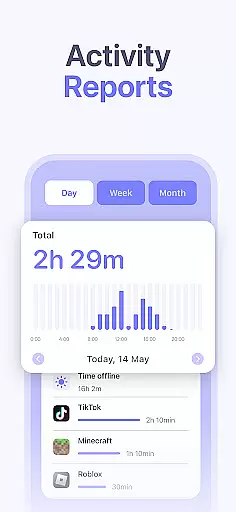
Tracking a child's growth in terms of digital habits and screen time is essential for fostering healthy development. Kidsee Parental Control App offers precise tracking of app usage, providing parents with detailed reports by the hour and day. This feature enables parents to understand their children's digital behavior patterns and make informed decisions about screen time management.
The app goes beyond basic tracking by allowing parents to set custom schedules for different times of the week, such as school days or weekends. This flexibility ensures that the app can adapt to the changing routines of family life while maintaining accurate records of usage patterns over time.
With Kidsee, parents receive scientifically-backed insights into their children's screen habits, empowering them to guide their kids effectively. The accuracy of this growth tracking feature supports parents in nurturing a balanced approach to technology use, ultimately contributing to their children's overall wellbeing.
Comprehensive parental controls
Real-time GPS tracking
Supports multiple child devices
Blocks inappropriate content
Flexible scheduling options
Requires constant internet connection
Limited free trial period
Some features need Accessibility permissions
Premium subscription required
Interface may feel complex for beginners

Comprehensive Parental Control & Child Safety — Hear & Protect Your Child World
 4.30
4.30
The Baby’s Bounty App is your hub to register for our diaper banks in Nevada
3.70
Family parental control app: limit screen time, block apps, GPS tracker.
4.20
Keep Your Family Safe with Pollog Family Assistants
4.10
Play activities, milestones, expert-led classes, baby tracker, and more!
3.00
Kids story books for children. Baby reading books with audio for pre-k toddlers
4.70
Introduce real food to baby with First Foods® Database, baby led weaning BLW
4.80
Parental control App for Location, Remote Camera, Screen Mirroring, Block Apps.
4.60
GeoLog - Real-Time Location Tracker
4.40
A simple way to track your baby’s breastfeeding, diaper changes, sleep patterns.
4.90
3D Baby size, Fruit comparisons, Smart Checklist, Trending Names & Training.
4.90
Track your labor contractions
4.90
Fun Ideas for Parents
4.70
It is a screen time management tool for games and mobile applications
4.50
Join over 1MM parents & professionals who've used OFW to navigate co-parenting
4.40
Affirmations | Stories | Bible
4.10
Educational resource for parents to inspire creativity in their children.
4.00
Save money on diapers. Get the Pampers Rewards app.
3.90
Happiest Baby App replaces the SNOO App (the mobile companion to SNOO & SNOObie)
3.20


User Reviews