
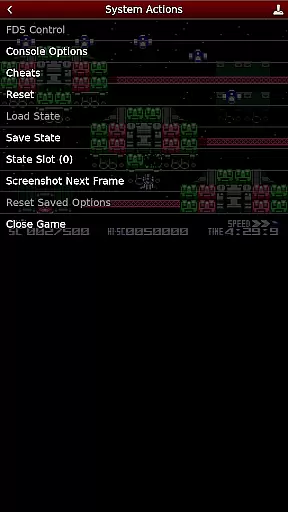
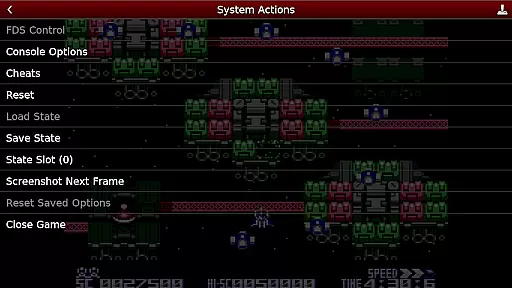
NES.emu is an advanced open-source NES emulator that offers a minimalist UI and focuses on low audio/video latency. It supports a wide range of devices, from the original Xperia Play to modern devices like the Nvidia Shield and Pixel phones. The app is based on FCEUX and provides users with a seamless emulation experience.
With support for .nes and .unf file formats, Famicom Disk System emulation, and VS UniSystem support, NES.emu caters to diverse gaming preferences. Its compatibility with FCEU cheat files and Zapper/Gun support enhances gameplay. Configurable on-screen controls and Bluetooth/USB gamepad & keyboard support make it versatile for various devices.
Whether you're reliving classic NES games or exploring new ones, NES.emu ensures an authentic and responsive gaming experience across multiple platforms.
NES.emu stands out with its comprehensive feature set tailored for NES enthusiasts. The app supports .nes and .unf file formats, optionally compressed with ZIP, RAR, or 7Z, catering to different user preferences. Famicom Disk System emulation using .fds files allows users to select BIOS in the options, enhancing authenticity.
VS UniSystem support enables users to insert coins by pushing Start, adding a layer of interactivity. The inclusion of FCEU-compatible cheat files (.cht extension) with editing features empowers users to customize their gaming experience. Zapper/Gun support lets users touch the screen to fire and touch & hold outside the display area to simulate firing away from the TV, providing immersive gameplay.
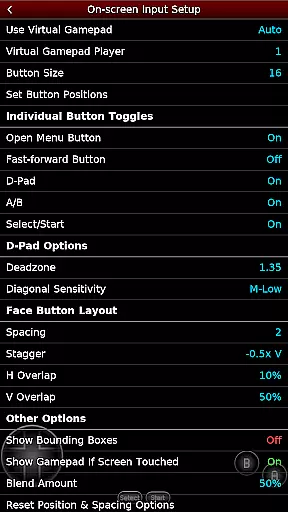
Configurable on-screen controls and Bluetooth/USB gamepad & keyboard support compatible with HID devices like Xbox and PS4 controllers ensure flexibility and convenience. By supporting Android's storage access framework, NES.emu allows users to open files on both internal and external storage seamlessly.
Arcade authenticity and nostalgia are crucial elements for any emulator aiming to recreate the classic gaming experience. NES.emu, as an advanced open-source NES emulator, excels in delivering this by supporting a wide array of devices from the original Xperia Play to modern ones like the Nvidia Shield and Pixel phones.
The app supports .nes and .unf file formats, optionally compressed with ZIP, RAR, or 7Z, ensuring that users can enjoy a vast library of games just as they remember them. Additionally, it offers Famicom Disk System emulation using .fds files, enhancing its nostalgic value for enthusiasts who appreciate the history of gaming.
With features such as VS UniSystem support and Zapper/Gun functionality, NES.emu not only brings back memories but also enhances gameplay through innovative controls. Users can touch the screen to fire, providing an immersive experience akin to playing in an actual arcade setting.
Control responsiveness is vital for an optimal gaming experience, especially when emulating classic arcade games. NES.emu ensures that every action taken by the player translates seamlessly into the game, thanks to its configurable on-screen controls and support for Bluetooth/USB gamepads.
This emulator supports a variety of HID devices recognized by the OS, including popular controllers like Xbox and PS4. This compatibility allows gamers to choose their preferred method of interaction, whether it be tactile buttons or touch screens, without compromising performance.
Moreover, the minimalist UI focuses on low audio/video latency, which further enhances control responsiveness. Players will appreciate how swiftly their inputs are registered, making each gaming session smooth and enjoyable, thus preserving the integrity of fast-paced arcade classics.
Low audio/video latency
Versatile device support
Famicom Disk System emulation
Cheat file compatibility
Customizable controls
No ROMs included
Complex setup for beginners
Limited touchscreen functionality
Occasional crashes reported
Device-specific issues

Spaceship racing on a rocky planet — pure action and challenge.
 4.4
4.4
Play retro games with ease – NES, SNES, PSX, PSP & more supported
4.0
Mine planets, upgrade your space ship, battle others, and dominate the galaxy!
3.90
Nostalgia.GBA Pro is a high quality GBA emulator.
4.40
Bounce through platforms. Avoid obstacles. Get the bouncing ball to the finish.
4.00
Relax and catch fish for your aquarium while earning rewards in these tank games
4.40
Absorb, or be absorbed...
4.70
Join the breathtaking chase!
4.80
Merge bowmasters to win the bow and arrow war! Play the fun archery game!
4.60
Jump and fly your way through danger in this rythm-based action platformer!
4.70
Save the Galaxy from galaxiga alien - Classic arcade shooter game
4.60
Nostalgia.GBC is a high quality GBC emulator.
4.50
Motorcycle racing games! Prove your paperboy can win in the bike race 3D!
4.50
PC Engine/TurboGrafx-16 Emulator
4.50
Premium version. Save the galaxy from alien shooter in this classic game
4.50
Suck the other’s blood and be the longest surviving mosquito!
4.40
Epic offline war strategy game - build your city, train your army, conquer
4.20
Protect the balloon! Only 1% of players can reach lvl 100 with all the balloons!
3.70
M64Pro FZX Classic Emulator for Android
4.4


User Reviews