
Lithium Pro is an advanced upgrade package for the free Lithium app, designed specifically for book enthusiasts who demand more customization and functionality. This premium version requires the base Lithium app to activate its exclusive Pro features.
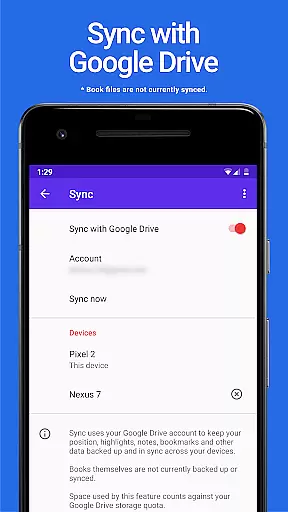
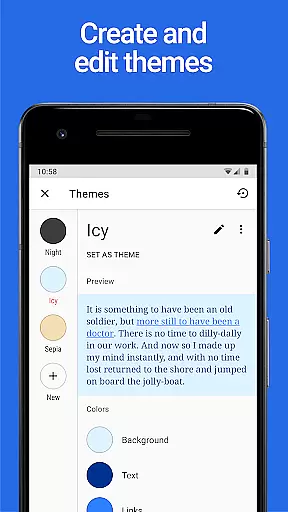
Key functionalities include automatic data synchronization across devices via Google Drive, allowing users to maintain a consistent reading experience. While book files themselves aren't synced, important metadata and settings are preserved. The app also offers extensive theme customization options, enabling users to personalize their reading interface with unique color schemes for backgrounds, text, and links.
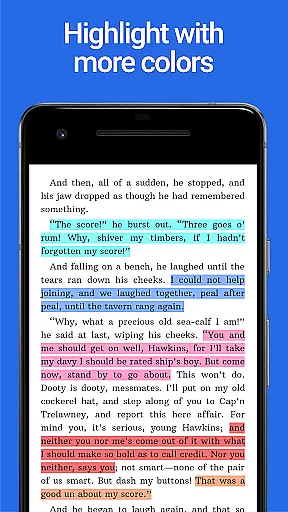
The Pro version stands out with its expanded highlight color palette, giving readers more ways to annotate and organize their digital books. As a value-added product, Lithium Pro represents a worthwhile investment for avid readers seeking enhanced control over their reading experience.
Lithium Pro distinguishes itself through several notable features that enhance the digital reading experience. The application's synchronization capability, powered by Google Drive integration, ensures that users can access their reading progress and preferences across multiple devices seamlessly.
One of the most significant enhancements is the custom themes feature. After upgrading, users gain access to advanced display settings where they can create, modify, and delete custom color schemes. This level of personalization extends to background colors, text shades, and hyperlink hues, allowing for a truly tailored reading environment.
Additionally, the Pro version expands the available highlight colors beyond the standard options. This feature, demonstrated in the app's screenshots, provides readers with more sophisticated tools for note-taking and content organization. The developers have also committed to adding more premium features in future updates, ensuring that the Pro version continues to deliver increasing value to its users.
When it comes to digital reading, the size and authenticity of an e-book library are crucial factors for avid readers. Lithium Pro understands this need and offers a seamless solution through its advanced Sync feature. While the app itself does not directly store books, it enables users to keep their reading data securely backed up on Google Drive.
This ensures that your entire library metadatau2014such as bookmarks, highlights, and progressu2014is preserved across all devices. Although book files themselves aren't synced, this approach provides peace of mind knowing that your reading preferences and data organization remain intact regardless of device changes.
The app also emphasizes copyright authenticity by working in conjunction with the free version of Lithium. By activating Pro features within the main application, users can trust that they're accessing legally obtained content without any risk of copyright infringement. This dual-app system ensures a smooth experience while maintaining ethical standards.
One of the standout features of Lithium Pro is its exceptional format compatibility, which caters to diverse reading preferences. The app supports various document formats, allowing users to import and read files from different sources without hassle. Whether you're dealing with EPUB, PDF, or other common e-book formats, Lithium Pro ensures that your documents will display correctly.
In addition to basic format support, the app offers advanced customization options through its Custom Themes feature. Users can personalize their reading experience by adjusting background colors, text colors, and link colors according to their preferences. This level of customization extends beyond simple format compatibility, providing a tailored reading environment that enhances comprehension and reduces eye strain.
The app's attention to detail is further demonstrated through its additional highlight colors and promised future features. These enhancements indicate the developer's commitment to continuous improvement and format optimization. With Lithium Pro, readers can enjoy a versatile and adaptable reading experience that accommodates both their content and visual preferences.
Enhanced sync capabilities
Extensive theme options
More highlight colors
Future feature updates
Seamless integration
Requires base app
No book backup
Higher cost
Limited standalone use
Google dependency

Bilingual dictionary with English translations of Modern Standard Arabic words.
 4.30
4.30
"Five Dr. Seuss titles in one omBook!"
4.60
“I am the Lorax. I speak for the trees.”
4.80
"BIG A, little a. What begins with A?"
4.10
Prime novels await! Fantasy & Romance on JoyRead. Immersive reads!
4.20
Holy Bible, a KJIV Bible study, audios & daily verses, talk with God now.
4.80
My Bible offers a comprehensive app by providing offline access, daily verses.
4.80
World's most comprehensive dictionary app: 13 languages, all online or offline!
4.80
A Comprehensive Restoration of Sacred Scripture
4.50
Read books PDF, EPUB, WORD, KINDLE, MOBI! Your ebook reader among reading apps.
4.80
Werewolf novels & romance stories in audiobooks for book lovers! Werewolf storie
4.60
Manage collectibles, survey and treasure maps in Elder Scrolls Online.
4.40
Learn Electricians' Handbook PRO complete guide beginners to advance.
4.40
Improve your vocabulary and grammar with the 15 biggest Oxford Dictionaries.
4.30
Provides location information of vehicle Shift Interlock releases.
4.30
A companion for prayer, with Azan alarm, Quibla direction, and Holy Quran book
4.10
A story reading app: Read stories, novels and books, or write your own.
3.90
Battle Royale Chapter 5 Season 2 HD Wallpapers Emotes Skins and BattlePass
3.00
A guide for the Court of Atonement spiritual healing process.
4.2


User Reviews