

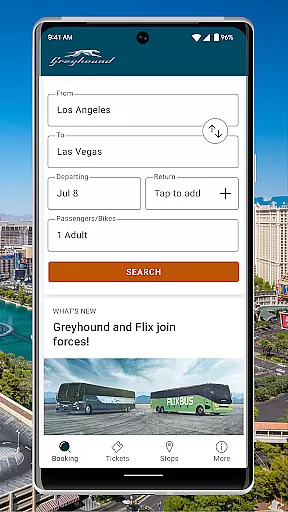
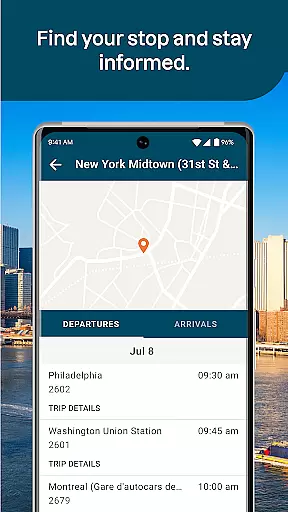
Greyhound is a premier travel application designed for booking low-fare bus tickets with enhanced flexibility and options. The app provides users with access to an extensive network of over 1900 bus routes across North America, including popular routes like Boston to New York and Los Angeles to Phoenix. With its refreshed interface, Greyhound now supports both Greyhound and FlixBus carrier schedules, offering more travel options at competitive prices.
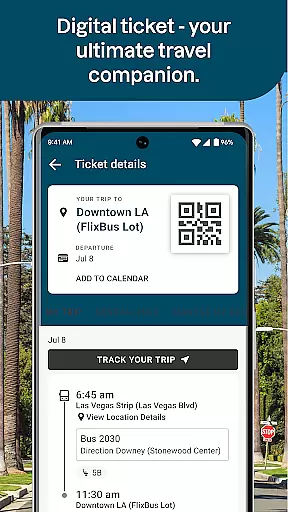
A standout feature of the app is the ability to choose your preferred seat on the bus, whether you favor a window or an aisle seat, for a small fee. Additionally, users can enjoy seamless convenience by displaying their tickets directly within the app via a QR code, eliminating the need for printing or checking in. Real-time trip updates and exclusive app-only discounts further enhance the travel experience, making it easier than ever to manage and optimize your bus journeys.
The Greyhound app boasts a variety of features that cater to modern travelers seeking convenience and customization. One of its key functionalities is the integration of multiple carrier schedules, including both Greyhound and FlixBus, which expands travel options significantly. This ensures that users have access to the most comprehensive range of bus trips and fares available.
Another notable feature is the seat selection option, allowing passengers to pick their preferred seat on the bus for added comfort. Whether you're looking for a window seat to enjoy the views or an aisle seat for easier access, this feature caters to individual preferences. Furthermore, the app simplifies the ticketing process by enabling users to display their tickets directly from their mobile devices, complete with live trip updates and exclusive email offers for app users.
These features collectively provide a streamlined and personalized travel experience, ensuring that users can book, manage, and enjoy their bus trips with minimal hassle.
Booking authenticity is a crucial aspect of any travel application, ensuring that the reservations made through the app are legitimate and reliable. With Greyhound, users can confidently book bus tickets knowing that the app provides verified schedules from trusted carriers like Greyhound and FlixBus.
The Greyhound app enhances booking transparency by offering real-time seat selection for an additional fee, allowing passengers to choose their preferred seats according to their comfort. This feature not only assures the authenticity of the booking but also adds a layer of personalization to the travel experience.
Moreover, users can conveniently access their tickets directly within the app, displaying a scannable QR code that eliminates the need for physical tickets or check-ins. This seamless integration ensures that each booking is authentic and effortlessly manageable from the user's mobile device.
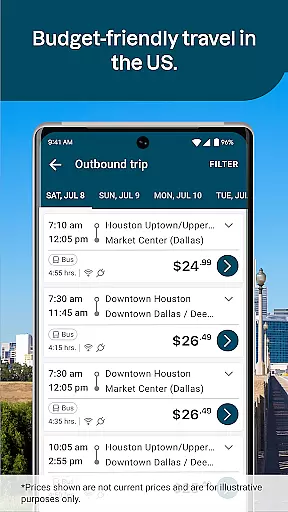
Price transparency in the travel industry means providing clear and upfront information about the costs associated with services. The Greyhound app excels in this area by presenting users with various fare options across multiple routes, ensuring they have all the pricing details before making a reservation.
In addition to straightforward fares, the app offers exclusive discounts available only to app users. These promotional offers are communicated via email, rewarding customers for using the digital platform and enhancing their overall savings on bus trips.
While optional features such as seat selection incur extra charges, these fees are clearly communicated within the app. Such openness about additional costs empowers travelers to make informed decisions regarding their bookings while maintaining trust in the service provided by Greyhound.
User-friendly interface
Extensive route options
Real-time updates
QR-based ticketing
Exclusive app discounts
Seat selection fee
Limited international routes
Occasional bugs
Ads in free version
Internet required

Maps Speedometer shows your current speed in any app
 3.60
3.60
View US public land boundary maps on your device.
3.70
Learn about one of the most famous Victorian cemeteries in the world
2.80
CLEAR provides a safer, easier way through airports, stadiums, and beyond.
4.20
Tickets, hotels, wait times, maps, mobile ordering, Disney PhotoPass & more
4.50
Download now and start earning rewards on hotels, tours, and everything travel.
4.50
Find your perfect somewhere with last minute hotel & travel deals!
4.80
Find the perfect vacation rental. Search from over 2 million properties.
4.80
Now you can book homes, experiences, and services—all in our redesigned app.
4.40
All-in-one delivery and taxi app. Ride, food, & grocery delivery app.
4.80
Save on gas and convenience with the earnify™ App
4.70
Book now to save with exclusive travel deals on hotels, flights, cars & packages
4.70
Easily rent a car at over 9,500 locations with the Enterprise car rental app.
4.60
Flight booking, hotel booking & more - all in one place with the Southwest App!
4.50
Maps, Wait Times, Park Hours
4.40
Managing your travel should be easy. With the Amtrak app, it is.
4.30
Get real-time traffic, directions, search and find places
4.10
Listen live to pilots and air traffic controllers around the world
3.80
OFFLINE detailed information about the Florida National and State Parks
4.4


User Reviews