
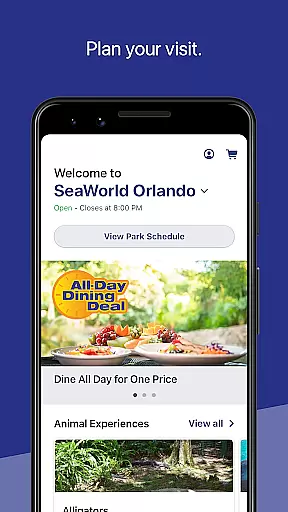
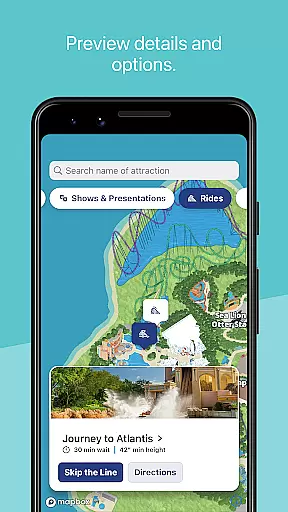
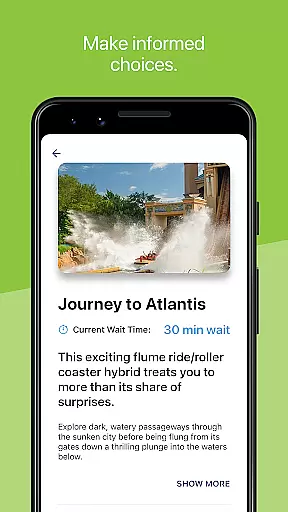
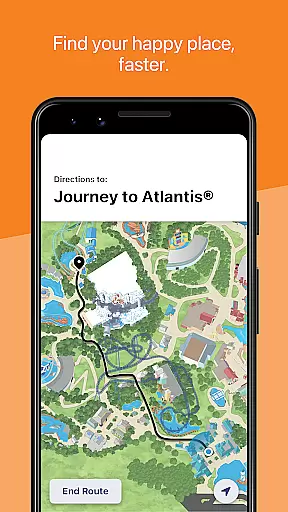
SeaWorld is a comprehensive travel companion app designed to enhance your park experience. The application serves as an all-in-one guide, offering tools for planning your visit, accessing essential park information, and navigating the premises. With features like ride wait times, show schedules, and interactive maps, it ensures you make the most of your day at SeaWorld.
The app also provides practical utilities such as ticket management and discount access, making it indispensable for frequent visitors and annual pass holders. Whether you're locating nearby attractions or finding amenities like restrooms, SeaWorld's app streamlines your park adventure, saving time and enhancing enjoyment.
SeaWorld app boasts a variety of features tailored to improve your park visit. One standout feature is its interactive map functionality, which allows users to pinpoint their location and discover nearby attractions with ease. This includes filtering points of interest by type, such as animal experiences or dining options, ensuring you never miss out on what matters most to you.
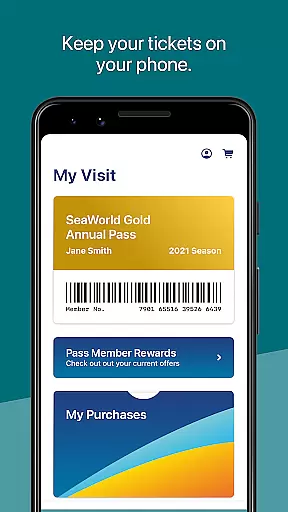
Another key aspect is the ability to manage your park-related purchases and memberships directly through the app. Users can conveniently access annual passes, barcodes, and discounts, eliminating the need for physical tickets. Additionally, real-time updates on ride wait times and show schedules empower guests to optimize their itinerary, creating a seamless and enjoyable SeaWorld experience.
When planning a visit to SeaWorld, ensuring the authenticity of your bookings is crucial for a seamless experience. The SeaWorld app provides reliable booking features that allow you to reserve various in-park services with confidence.
Through the app, users can secure their spot for shows, rides, and special experiences such as Quick Queueu00ae and All Day Dining Deal. This guarantees that visitors have a confirmed space, eliminating the uncertainty that often comes with on-site bookings.
The app's booking system is directly integrated with SeaWorld's services, ensuring that all reservations are accurate and instantly confirmed. This direct connection provides peace of mind, knowing that your plans are set and recognized by the park.
By using the SeaWorld app for your bookings, you gain access to an organized itinerary of your day, complete with timings and barcodes ready for scanning at the venue. This feature not only assures the legitimacy of your bookings but also enhances your overall park experience through meticulous planning and execution.
Understanding the costs associated with your SeaWorld visit is essential for budgeting and peace of mind. The SeaWorld app excels in providing clear and comprehensive price transparency across its offerings.
Users can view detailed pricing for various upgrades and services within the park, such as Quick Queueu00ae, Reserved Seating for shows, and dining deals. This allows guests to make informed decisions about where and how to spend their money during their visit.
In addition to service-specific costs, the app also displays any discounts available to annual pass holders, ensuring subscribers can take full advantage of their benefits. This level of detail helps prevent unexpected expenses and makes financial planning more straightforward.
With all pricing information readily accessible in one place, the SeaWorld app empowers visitors to manage their budgets effectively while enjoying a transparent and hassle-free booking process.
User-friendly interface
Interactive park maps
Real-time updates
Convenient ticket access
Comprehensive park guide
Limited to SeaWorld parks
Occasional bugs reported
Requires constant updates
In-park connectivity issues
No offline functionality

Explore our parks like never before with the completely reimagined Six Flags app
 4.30
4.30
INDOT Trafficwise is a traffic and traveler information mobile app.
4.00
View current Montana road conditions, cameras, plows, and timelapse videos.
4.70
CLEAR provides a safer, easier way through airports, stadiums, and beyond.
4.20
All-in-one delivery and taxi app. Ride, food, & grocery delivery app.
4.80
Get real-time traffic, directions, search and find places
4.10
Rent the perfect car for wherever you’re going
4.90
Managing your travel should be easy. With the Amtrak app, it is.
4.30
Frontier’s Android app makes travelling easier than ever before!
4.70
Streamline your U.S. entry
4.90
The travel app that makes booking cheap flights, hotels, and car rentals easy.
4.80
Find your perfect somewhere with last minute hotel & travel deals!
4.80
Vacationing on CARNIVAL? Maximize your fun on board with the ultimate cruise app
4.60
Stack Upside with your current credit & debit rewards for even more cash back!
4.50
Now you can book homes, experiences, and services—all in our redesigned app.
4.40
A tool for outdoor activities.
4.30
Real-time flight tracking with live maps and flight status updates.
3.70
Everything you need for your trip in one place with the Volaris app.
3.60
View delays, closures, and weather-related conditions on Missouri state roads.
3.30


User Reviews