
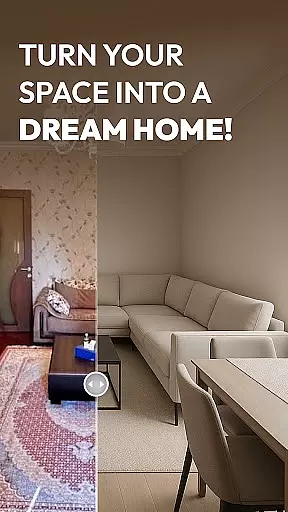
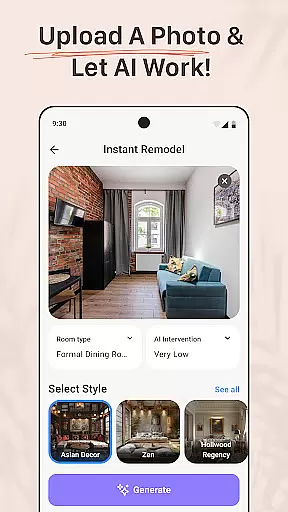
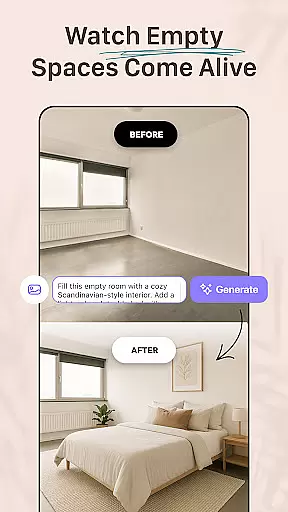
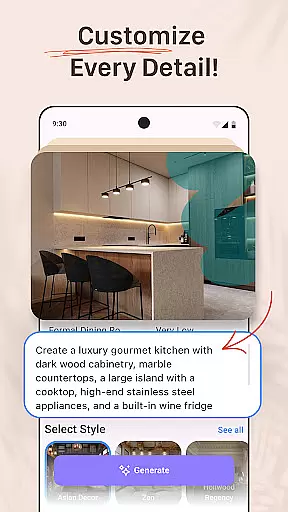
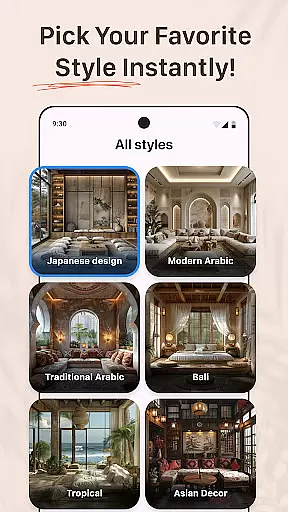

AI Remodel is a cutting-edge AI-powered home design application tailored for homeowners, renters, and professional designers. It offers intuitive tools to plan, design, and visualize dream spaces with precision. The app provides features such as 3D room planning, smart layout suggestions, and seamless integration with Planner 5D for accurate, high-resolution designs.
Users can upload photos or start from scratch, exploring various interior design styles, color palettes, and furniture arrangements. Whether redesigning a single room or an entire home, AI Remodel ensures creative freedom and confidence in decision-making before any physical changes are made.
AI Remodel stands out with its advanced AI-driven design capabilities. The app suggests layouts, furniture placements, and color schemes based on user input or uploaded photos. Its interactive 3D room planner allows users to drag, drop, and rotate elements within a responsive environment, offering a realistic preview of their designs.
Additional functionalities include custom floor plans, real-time measurements, and material testing. With Planner 5D integration, users can scale designs accurately and export professional-grade plans. These innovative tools cater to both beginners and professionals, streamlining the design process while maintaining creative control.
Property listing authenticity is a crucial feature for any home design and renovation app like AI Remodel. This ensures that all the design elements, floor plans, and 3D renderings accurately represent the actual space you are planning to renovate or design.
AI Remodel uses advanced AI tools to create precise and reliable representations of your home. By uploading a photo or starting from scratch, the app generates accurate layouts, suggests color palettes, furniture placement, and material combinations that reflect real-world possibilities. This level of authenticity helps users make informed decisions about their renovations before any physical work begins.
The benefit of such an authentic representation is the confidence it provides to homeowners, renters, and professional designers. They can explore different styles, experiment with various designs, and visualize the final outcome with high precision. This reduces the risk of costly mistakes and ensures that the final design aligns perfectly with the user's vision.
In summary, AI Remodel's commitment to property listing authenticity empowers users to transform their living spaces with accuracy and reliability, making the entire design and renovation process more efficient and satisfying.
Home management features in AI Remodel offer comprehensive tools for planning, designing, and visualizing your dream home. These features ensure that every aspect of your renovation project is meticulously managed, providing full creative control over every detail.
The app includes smart layout tools that allow users to draw custom floor plans, move walls, add lighting, and test different materials all within a single platform. With the integration of Planner 5D, users can scale accurately, measure in real time, and export high-resolution plans. This seamless functionality supports both beginners and professionals in executing their design ideas with precision.
One significant advantage of these home management features is the ability to simulate real-world conditions and visualize the end result. Users can experiment with various styles, from minimalism to boho, and explore curated looks or generate unique designs using AI suggestions. This flexibility encourages creativity and innovation, enabling users to achieve their desired aesthetic effortlessly.
Ultimately, AI Remodel's home management features streamline the renovation process by offering intuitive UX, precision editing, and powerful room AI interior design capabilities. Whether you're a homeowner, renter, or professional designer, these tools provide clarity and style, ensuring successful project outcomes.
User-friendly interface
Advanced AI suggestions
3D visualization tools
Planner 5D integration
Versatile design options
Requires learning curve
Limited free features
Premium subscription cost
Occasional glitches
High system requirements

Universal TV remote Control for Roku TV brands via WiFi remote
 4.1
4.1
This Fire TV Remote control's your Fire TV Device and Insignia Fire TV Remote
3.70
Resident Center, powered by Buildium, is designed with simplicity in mind.
4.50
Smart AI plant care schedules, Real plant experts, support & Thriving community!
4.20
IP camera view and playback, for your WiFi cam or home security cctv system.
3.70
Book your local plumber 24/7, track your service order & get exclusive coupons
4.00
Find contractors for all home renovation projects. Remodeling, repair, and more.
4.20
Control your Vivint Smart Home with the next generation Vivint App.
4.30
Search for Homes, Rentals, Agents & Schools
4.70
MLS-powered real estate app to find homes for sale & apartments for rent
4.70
B-hyve Pro App for landscape irrigation professionals
4.70
Turn old phones into security cameras, baby monitors, pet cams, and more.
4.70
Innovative and budget-friendly housing options
4.60
Security App with HD Video, 2-way Audio, and event detection for Home monitoring
4.40
For all of your Airthings devices
4.30
AI floor creator to design your dream house, plan rooms & style your home
4.00
Design house plans in 2D & 3D, style furniture, and preview renovation layouts
3.70
Draw your floor plan smartly. Make house design blueprint with home planner app
3.60
Universal TV Remote for TV, control all Smart TVs with your mobile phone.
4.3


User Reviews