


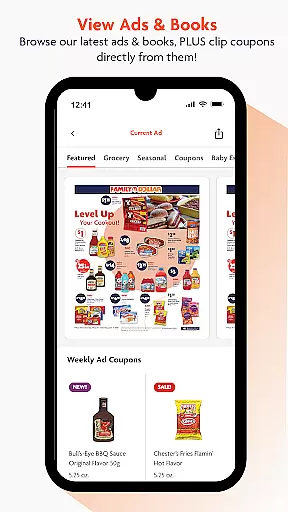
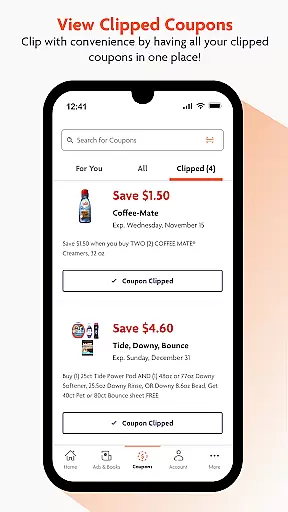
Family Dollar is a shopping app designed to help users save money while shopping. The app offers Smart Coupons, which allow users to save up to $500 per week by clipping and redeeming coupons in-store. It provides personalized content and offers, making it easy for users to find deals on their favorite brands and everyday essentials.
In addition to coupon clipping, the app features a barcode scanner that lets users scan product barcodes in-store to check for available coupons. This functionality ensures that users never miss an opportunity to save while shopping. With regular updates and special coupon events, Family Dollar keeps users engaged with new deals and savings opportunities every week.
The app is particularly useful for budget-conscious shoppers who want to maximize their savings on groceries and household items. By offering a tailored experience with personalized offers and seasonal savings, Family Dollar makes it easy and fun for users to shop smarter and save more.
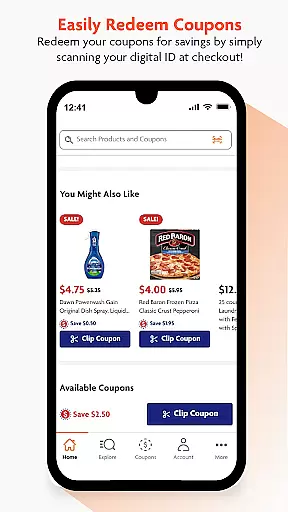
Family Dollar app stands out with its robust set of features designed to enhance the shopping experience. One of the key features is the Smart Coupons system, which allows users to clip coupons directly from ads and redeem them in-store. This feature simplifies the process of finding and using coupons, ensuring users can take full advantage of available discounts.
Another notable feature is the in-app barcode scanner. Users can scan product barcodes while shopping to instantly check for applicable coupons. This real-time functionality helps users make informed purchasing decisions and maximize their savings. Additionally, the app provides personalized content and offers based on user preferences, ensuring a customized shopping experience.
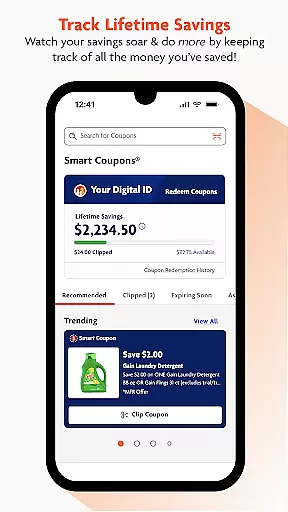
The app also tracks users' lifetime savings, giving them a clear view of how much they have saved over time. With regular updates and special coupon events, Family Dollar continuously offers new ways to save, keeping users engaged and motivated to use the app regularly. These features collectively ensure a seamless and rewarding shopping experience.
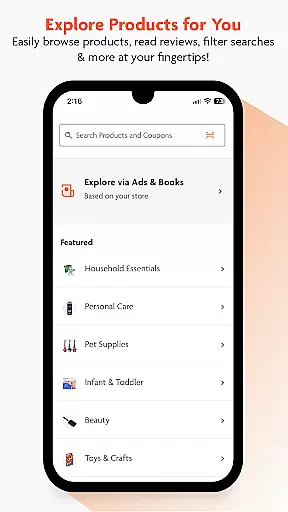
Family Dollar offers an extensive range of products, ensuring that customers can find everything they need in one place. The app provides a well-organized categorization system, making it simple to navigate through various sections such as groceries, household essentials, apparel, and more.
With personalized content and offers, the Family Dollar app tailors the shopping experience to individual preferences. Users can easily discover items they are interested in, thanks to the intuitive search function and logically arranged categories. This feature not only saves time but also enhances the overall shopping experience by presenting relevant products front and center.
The app's ability to display hot deals and seasonal savings ensures users are always aware of the best offers available. By regularly updating its product listings and promotions, Family Dollar keeps shoppers informed and engaged, encouraging them to return for more savings.
Overall, the comprehensive selection and smart organization of products within the app make shopping at Family Dollar both efficient and enjoyable. Customers can take advantage of weekly deals, special coupon events, and personalized offers, ensuring they save on their favorite brands and everyday essentials.
One of the standout features of the Family Dollar app is its pricing transparency. Users can easily access information about current prices, discounts, and savings opportunities directly within the app. This openness helps build trust with customers, as they know exactly what they are paying and how much they are saving.
The app goes a step further by offering price comparisons and highlighting competitive deals. Shoppers can quickly identify the best offers and make informed purchasing decisions. With notifications about special coupon events and occasions throughout the year, users are always in the loop regarding cost-effective options.
Moreover, the Family Dollar app emphasizes competitive pricing by providing regular updates on new deals and hot offers. These timely alerts ensure that users never miss out on significant savings, whether it's a seasonal promotion or a limited-time discount on popular items.
By combining transparent pricing strategies with competitive market positioning, the Family Dollar app empowers consumers to maximize their savings while enjoying a seamless shopping experience. This approach not only benefits the wallet but also enhances customer satisfaction and loyalty.
User-friendly interface
Significant weekly savings
Personalized offers
Easy coupon redemption
Barcode scanning technology
Limited to Family Dollar stores
Requires frequent updates
Occasional bugs reported
Dependent on in-store usage
No direct competitor integration

With the IKEA app, you can explore, shop for furniture, and check out—simply.
 4.70
4.70
NCPMobile is the easy and intuitive way to scan and transmit your purchases!
4.50
Track all of your packages and online orders in one app - Amazon, FedEx, & USPS
4.70
New styles & exclusive offers
4.80
Harbor Freight Coupons - Generators, Air Compressors, Tool Storage, and More.
4.70
wholesale stores
4.10
Earn cash back and rewards from games, surveys, receipts and more
4.70
Buy now, pay later with flexible payments made to fit your budget.
4.00
Create Wishes & Get Inspired
3.20
Pet food, pharmacy, toys, apparel & more. Shop and save on pet care with Chewy.
4.90
Furniture, Décor & Design Tips
4.80
Shop for apparel: From jeans to dresses, to kids fashion and mens clothing!
4.80
Save money on groceries & more. Choose delivery, pickup or Scan & Go shopping!
4.80
Flexible payments, big savings
4.80
Trendy Athleisure Wear. Affordable Skirts, Leggings, Functional & All Sizes!
4.60
The Live Shopping Marketplace
4.60
Healthy living for less just got easier with our updated Sprouts App.
4.50
Buy & sell local items. Find amazing deals. Join the largest mobile marketplace!
4.40
Smiles found here
3.90


User Reviews