





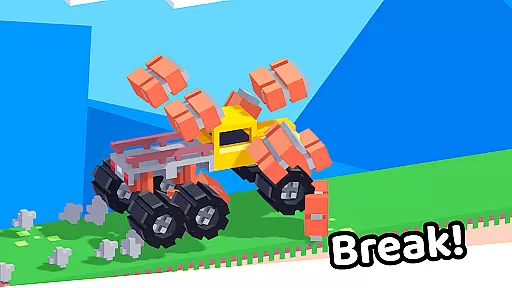




Drive Mad is a physics-based racing game that challenges players to master realistic driving mechanics. With simple controls - right to accelerate and left to brake, the game offers an authentic driving experience that requires actual skill to navigate through complex tracks.
The game features over 100 challenging levels designed to progressively test players' abilities to perform impossible stunts and tricks. Its optimized design delivers fast performance with a tiny install size, while supporting offline play, making it an ideal mobile racing companion.
Drive Mad distinguishes itself through its advanced physics engine that simulates real-world driving dynamics. The game's progressive difficulty curve ensures players develop their skills naturally as they advance through increasingly complex tracks.
A key feature is the game's compact design - maintaining a small install size while delivering high-quality graphics and smooth performance. Players can enjoy uninterrupted racing action both online and offline, with responsive touch controls that provide precise handling during intense stunts and races.
Realistic physics simulation is at the core of Drive Mad's driving experience. The game employs advanced physics engines to replicate real-world vehicle dynamics, ensuring that every turn, acceleration, and brake feels authentic.
The level of realism is designed to challenge players' actual driving skills. As users progress through over 100 levels, they will need to master the physics to execute complex tricks and stunts successfully. This learning curve provides a rewarding sense of achievement as players improve.
What sets Drive Mad apart is how it balances realism with fun. While the physics are challenging, they are also forgiving enough to allow experimentation. Players can test different techniques and strategies without feeling penalized for mistakes.
Precision control is essential in Drive Mad, where every millisecond of input matters. The game features an optimized control system that ensures minimal input latency, allowing for responsive and accurate maneuvers during high-speed races.
With simple controls - right to accelerate and left to brake - the game focuses on delivering a seamless connection between player intent and in-game action. This streamlined interface makes the game easy to pick up while maintaining depth for skilled players.
The developers have paid special attention to performance optimization, resulting in fast response times even on lower-end devices. Combined with offline play capability and small install size, this ensures smooth gameplay regardless of device specifications or internet connectivity.
Realistic physics simulation
Over 100 challenging levels
Compact install size
Smooth performance
Offline play support
Steep learning curve
Limited control options
No multiplayer mode
Repetitive track designs
Occasional bugs

Be ready to overtake on time!
 4.30
4.30
Online open world city racing simulator. It's a multiplayer, realistic car game.
4.50
The amazing 3D kart racing game. Race, collect, upgrade and win!
4.50
Master your off-road driving skills in this hardcore, physics-based racing game.
4.90
Console quality rally racing
4.70
Old-school dirt racing meets cutting-edge tech!
4.10
Race cars on asphalt, drift in the most wanted street racing car game with nitro
4.40
The open world car driving simulator with the ultimate graphic updates
4.30
Race and win! Car racing games, real extreme. Drift, tuning & stunt driving!
4.50
Get your ride and explore a trial racing paradise in Stunt Bike Extreme!
4.70
Need for speed to burn the asphalt and compete with rider across the world!
4.60
The Drag Racing Game where you build your Dream Driving Car Collection!
4.60
The Next-Gen of Endless Motorbike Racing
4.40
Race rocket powered hydrojets through futuristic cities and waterparks.
4.40
Dr. Driving drives you crazy!
4.30
Race uphill to win in this offline physics based driving game!
4.20
Tune up your cars and race around the city with your friends!
4.10
Race with Catboy, Owlette and Gekko on a brand new lunar adventure!
3.90
Evolve through the Timelines!
3.90


User Reviews